PROPlus / PRO Series Automated Dispensing Systems
28 www.nordsonefd.com info@nordsonefd.com +1-401-431-7000 Sales and service of Nordson EFD dispensing systems are available worldwide.
Refer to “Navigation
and Jogging
Window” on
page36.
Refer to “Horizontal
and Vertical Toolbar
Icons” on page34.
Refer to “Setup and
Dispense Command
Icons” on page35.
Refer to “Secondary
View Screen” on
page32.
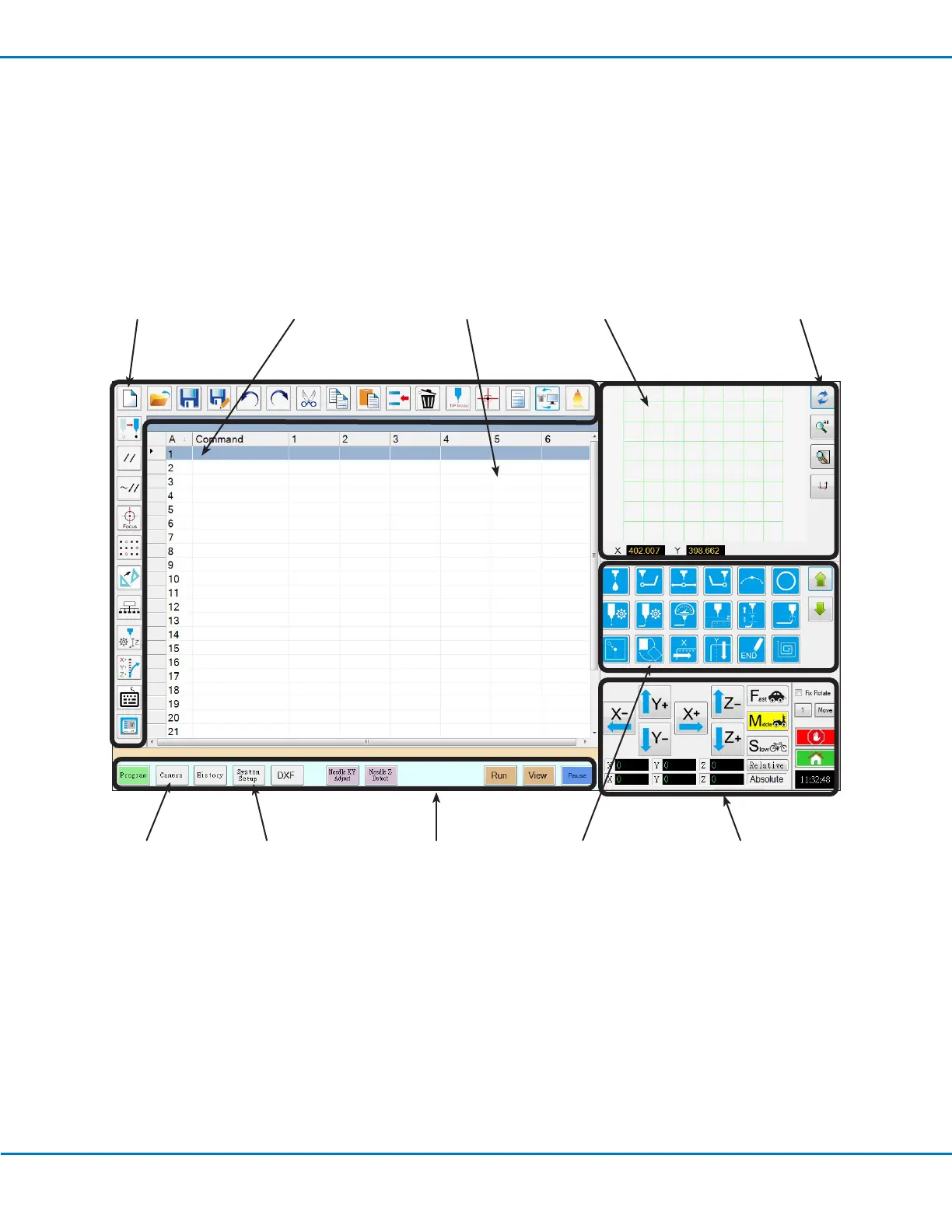
Overview of the DispenseMotion Software
This section provides an overview of all the DispenseMotion software screens, windows, and icons. This information
is provided for your reference as needed. To set up the system and create dispense programs, refer to “Setup” on
page43 and “Programming” on page63. The software opens at the Program screen.
Refer to “Horizontal
and Vertical Toolbar
Icons” on page34.
Refer to “System
Setup Screen” on
page38.
Refer to “Camera
Screen, Tab Bar,
and Icons” on
page39.
Refer to “Primary View
Screen and Tab Bar”
on page30.
Refer to “Primary View
Screen and Tab Bar” on
page30.
Command address (A): Double-
click to open the command
drop-down menu; select a
command to open its command
window. Refer to “Command
Windows” on page29.



 To Next Page