PROPlus / PRO Series Automated Dispensing Systems
32 www.nordsonefd.com info@nordsonefd.com +1-401-431-7000 Sales and service of Nordson EFD dispensing systems are available worldwide.
Selected
Tab
Tab Color
When Selected
Secondary Screen Display Function
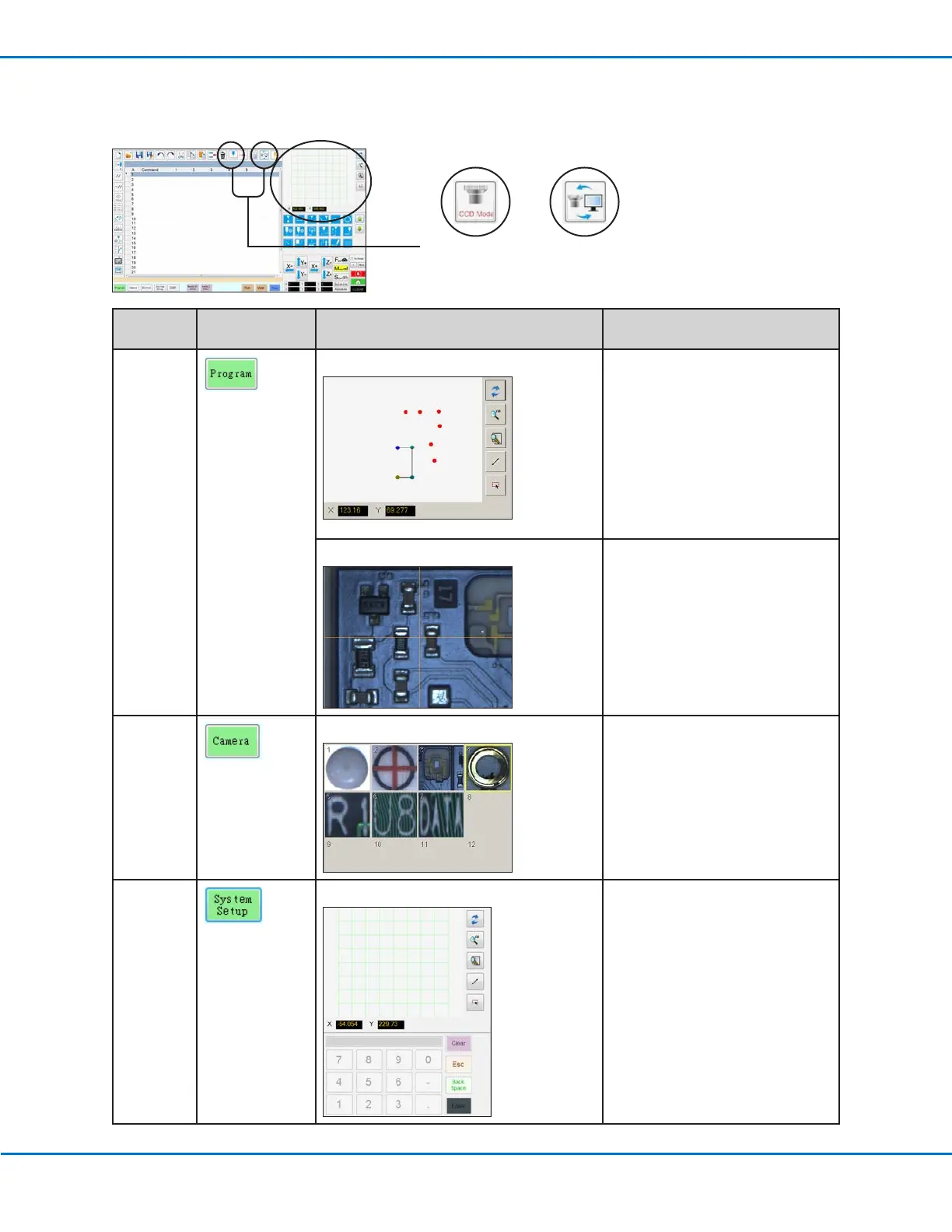
Program
When the Path icon is toggled ON: When the Path icon is toggled ON,
shows a visual representation of
the programmed pattern and the
Path mode icons:
• Refer to “Horizontal and Vertical
Toolbar Icons” on page34 for
an explanation of the icons.
• Refer to “Secondary View Screen
in Path View” on page33 for
additional path view functionality.
When the Path icon is toggled OFF:
When the Path icon is toggled OFF,
shows an actual view of the fixture
plate or workpiece surface as seen
by the camera.
Camera
Mark Library: Stores up to 240 mark files.
System
Setup
Path view and keypad: The keypad is used to enter
numeric values. Refer to “Keypad”
on page42.
Path iconMode icon (toggles
between Tip mode
and CCD mode)
Secondary View Screen
The Secondary View screen changes depending on the selected tabs and icons.



 To Next Page