PROPlus / PRO Series Automated Dispensing Systems
41www.nordsonefd.com info@nordsonefd.com +1-401-431-7000 Sales and service of Nordson EFD dispensing systems are available worldwide.
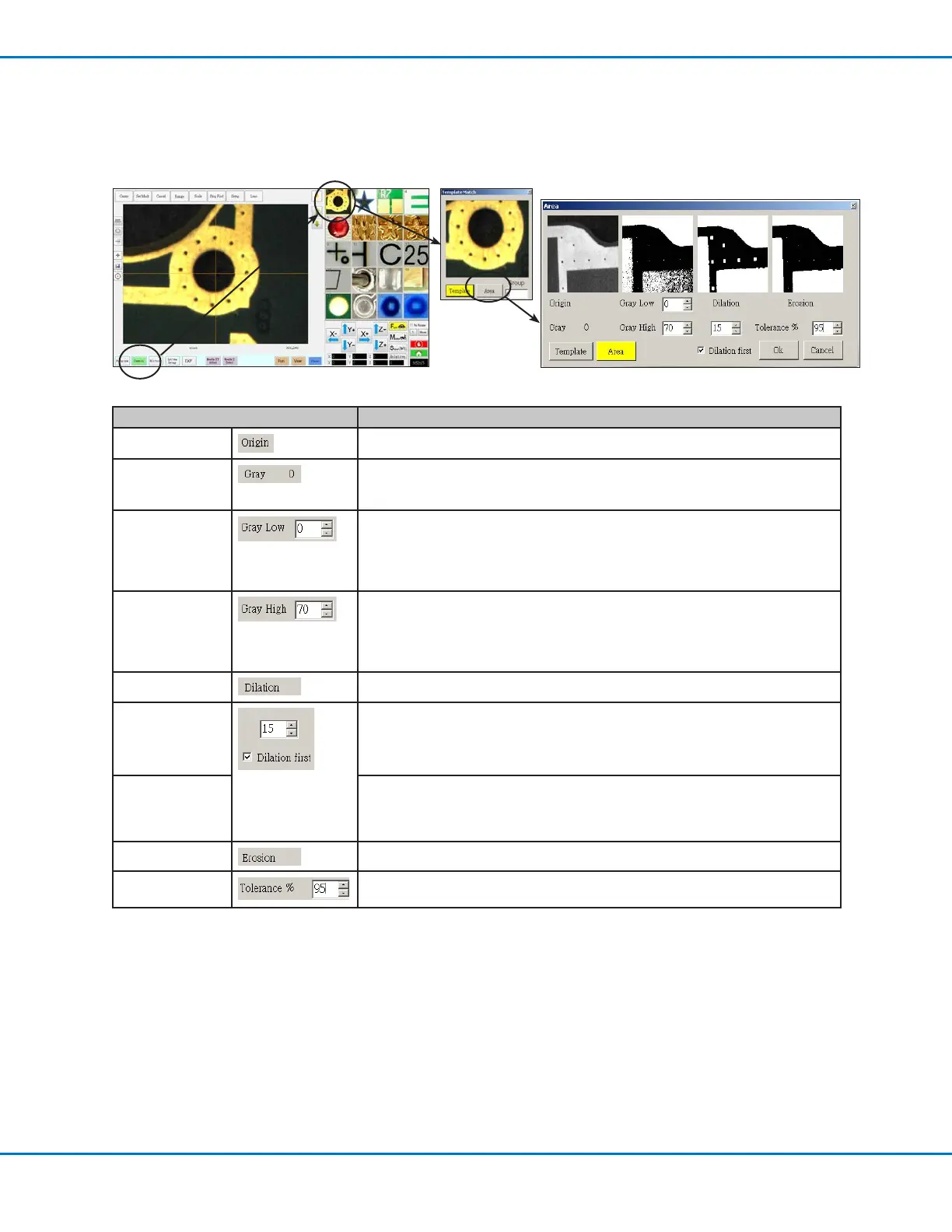
Template Match and Area Windows
Once a mark is stored in the Mark Library, you can right-click on the mark image cell and select PROPERTY to open
the Template Match window. The Template Match window provides access to the Area window, which is used to
fine-tune how the camera evaluates a mark.
Template Match Area Window Section Function
Origin
Displays the open mark image.
Gray Displays the gray rating for the selected point in the original image. When a point is
selected, the value changes to reflect the gray level at that point. Knowing this value
makes it easier to determine the best Gray Low and Gray High values to set.
Gray Low
Adjusts the gray low-tolerance value. The lower the value, the more white is
tolerated in the image. The higher the value, the less white is tolerated in the image.
NOTE: Gray Low values are typically lower than Gray High values.
Range: 0–255
Gray High
Adjusts the gray high-tolerance value. The lower the value, the less white is tolerated
in the image. The higher the value, the more white is tolerated in the image.
NOTE: Gray High values are typically higher than Gray Low values.
Range: 0–255
Dilation
Displays how the image appears after the Dilation calculation.
Dilation First
counter
When Dilation First is checked, the counter above the Dilation First checkbox
controls the zoom of the image. When Dilation First is unchecked, the counter
controls how much of the non-gray areas in the image are ignored.
Range: 0–20
Dilation First
checkbox
Sets the order in which the dilation and erosion calculations are performed. If the
Dilation First checkbox is checked, the system performs the dilation calculation first.
If the checkbox is unchecked, the system performs the erosion calculation first.
When Dilation First is unchecked, the Dilation and Erosion labels switch places.
Erosion
The image above Erosion shows how much white is filtered from the image.
Tolerance Sets the tolerance for how similar other mark images can be to the selected image,
allowing the system to eliminate similar marks.



 To Next Page