PROPlus / PRO Series Automated Dispensing Systems
89www.nordsonefd.com info@nordsonefd.com +1-401-431-7000 Sales and service of Nordson EFD dispensing systems are available worldwide.
How to Use Mark Follow to Dispense Along a Curved Line (continued)
To Use Mark Follow and / or Mark Follow Adjust in a Program (continued)
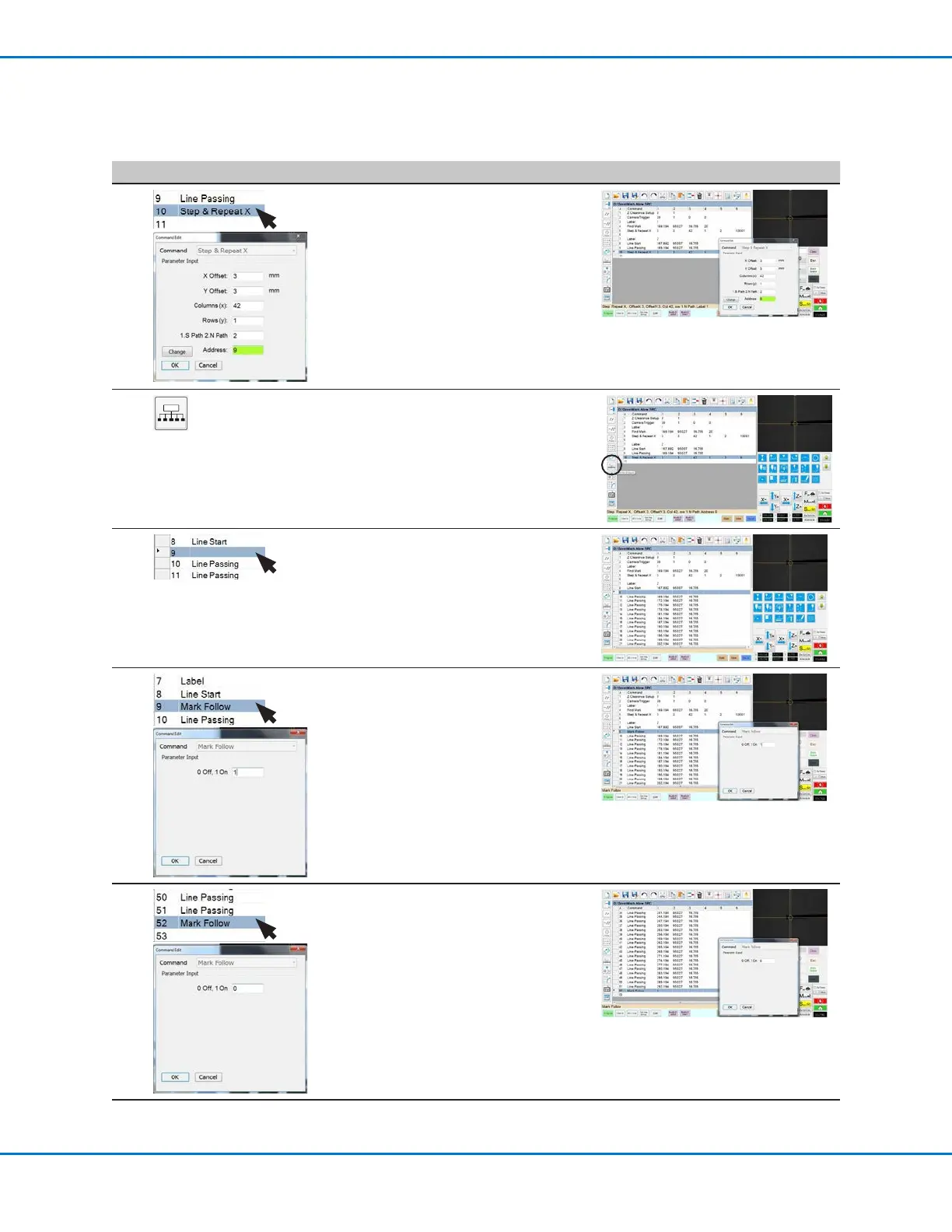
# Click Step Reference Image
6
>
• In the next empty address (line 10 in
this example), insert a second Step &
Repeat X command.
NOTE: This Step & Repeat command is
the same as the previous Step & Repeat
command (Line 5 in this example),
except for the Label.
• Change the last parameter from Label
to Address and enter the address of the
first Line Passing command (line 9 in
this example).
7
• Click EXTEND STEP & REPEAT.
The system extends the Step & Repeat
X command by adding Line Passing
commands for many line passing points
along the line.
8
• Insert a blank address after the Line
Start command (line 8 in this example).
9
>
• In the blank address, insert a MARK
FOLLOW command.
• Enter 1 to set the command to ON.
10
>
• After the last Line Passing command
(line 51 in this example), insert another
MARK FOLLOW command.
• Enter 0 to set the command to OFF.
Continued on next page



 To Next Page