About the Nortel IP Phone 1140E
19
Telephone display
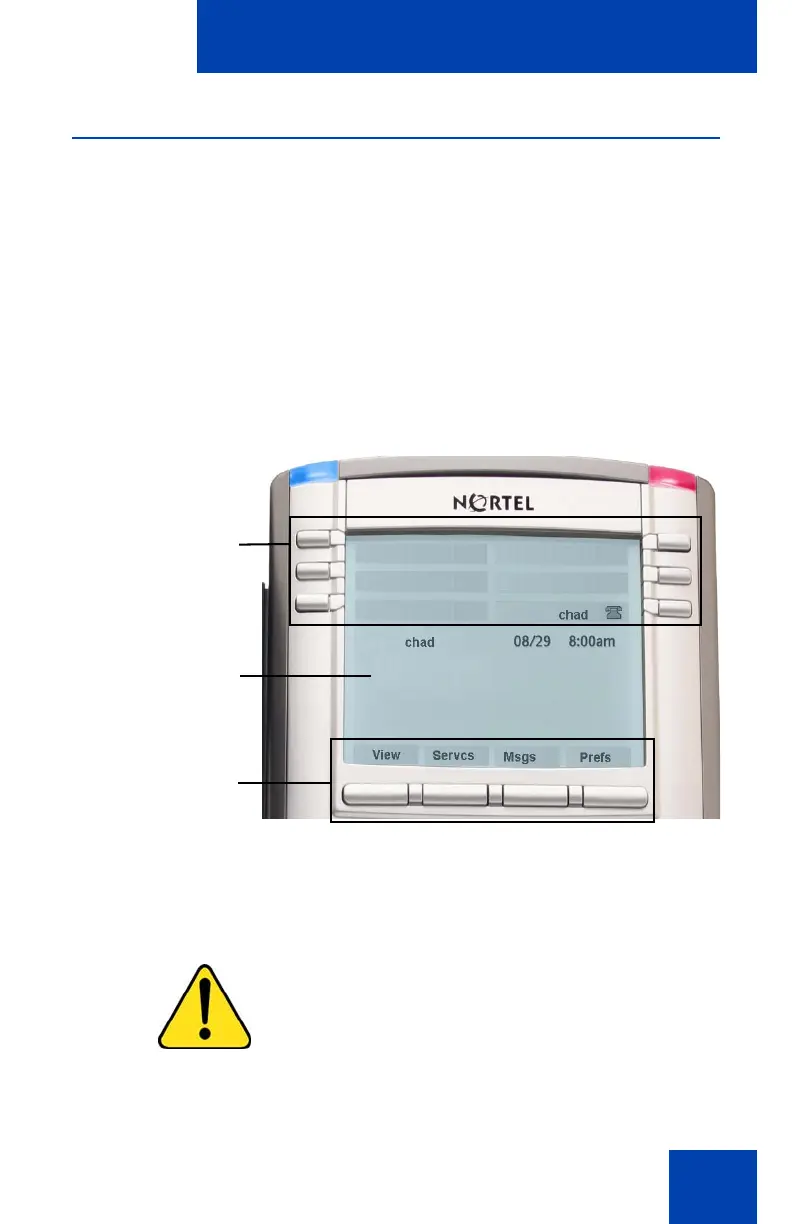
Your IP Phone 1140E has three display areas:
• The upper display area provides line and feature key status.
• The middle display area contains single-line information for items
such as caller number, caller name, menu items, feature prompt
strings, user-entered digits, date and time information, and telephone
information.
• The lower display area provides feature Context-sensitive soft key
label information.
Figure 3: IP Phone 1140E LCD screen
Cleaning the IP Phone 1140E LCD display screen
To clean the LCD display screen, gently wipe with a soft, dry cloth.
CAUTION
Do not use any liquids or powders on the
IP Phone. Using anything other than a
soft, dry cloth can contaminate IP Phone
components and cause premature failure.
Upper display area
User-defined
feature key labels
Middle display area
Date/Time display
Call party information
Menu information
Directories information
Lower Display Area
Context-sensitive key
labels

















 To Next Page