27
Installation
4.4 Home menu
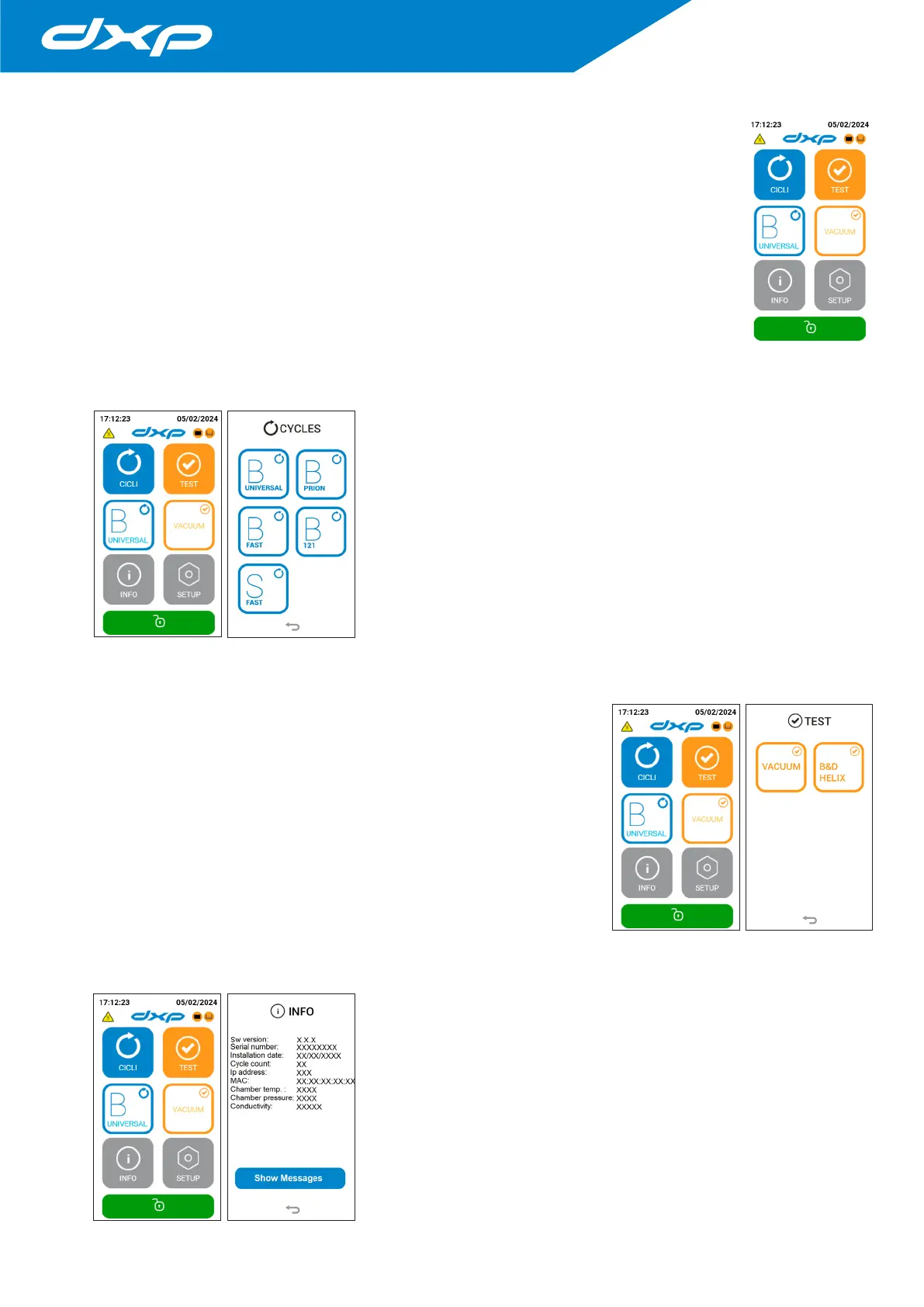
The device has a HOME screen, where you can easily find the main menu of selectable programs
and tests (CYLCES and TESTS), the selection of the most used cycles (B UNIVERSAL and VACUUM),
the INFO menu (with a quick view of all general information of the device, such as serial number,
firmware version and water conductivity) and the SETTINGS menu (to manage the parameters
of configuration of the autoclaves, including date and time regulation, language selection, report
download, connections with printers and ethernet).
4.5 Cycles menu
The cycle selection procedure starts from the Main Menu by pressing the
CYCLES button.
For information on starting and managing a cycle, see chapter 5.
4.6 Test menu
The TEST menu allows to select the test cycles to check the performance of the
device.
4.7 Info menu
The INFO menu allows to have a quick view of all general information of
the device, in this menu all the information relating to the life of the device
is available (software version, installation date, completed cycles) and all the
enabled / disabled functions of the device.


 To Next Page