31
Installation
4.8.3 Printers menu
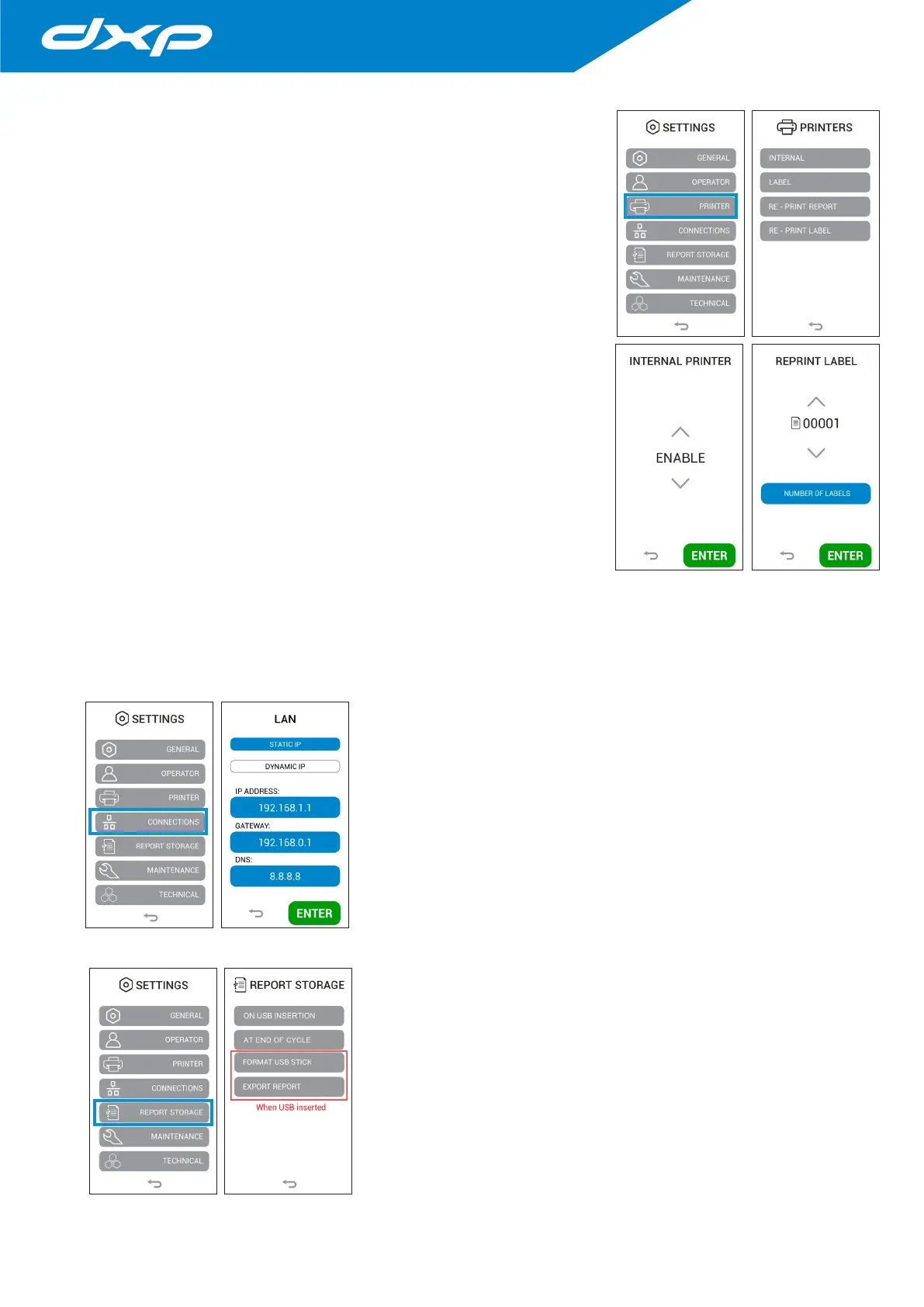
Pressing the PRINTER button you access on the printer magament menu (if
available). In this menu you can manage the internal label, the external printer
that generate labels, the printer that generate reports and any reprints.
4.8.3.a Activation / Deactivation internal printer
Pressing the INTERNAL button you access on the menu for activating or
deactivating the internal printer.
Pressing the ENTER button the data is confirmed and the screen returns to the
printers menu.
4.8.3.b Activation / Deactivation label printer
Pressing the LABEL button you access on the menu for activating or deactivating
the label printer.
Pressing the ENTER button the data is confirmed and the screen returns to the
printers menu.
4.8.3.c Activation / Deactivation report printer
Pressing the REPORT button you access on the menu for activating or deactivating
the report printer. Pressing the ENTER button the data is confirmed and the
screen returns to the printers menu.
4.8.3.d Re-print the label
Pressing the RE-PRINT LABEL button you access on the menu for reprinting label. In this menu it is possible to select the
cycle whose labels you want to reprint and the number of labels.
Pressing the ENTER button the data is printed and the screen returns to the printers menu.
4.8.4 Connections menu
Pressing the CONNECTIONS button you access on the connections menu. In this
menu it is possible to manage the LAN connections.
Once the device is wired, through the specific Ethernet socket on the back,
select the connection options on dynamic IP (DYNAMIC IP) or static (STATIC IP).
(In DYNAMIC IP mode the IP address is assigned automatically).
Pressing the ENTER button the data is confirmed and the screen returns to the
connections menu.
4.8.5 Archiviation report menu
Pressing the REPORT STORAGE button you access on the archiviation report.
In this menu you can manage the report storage, export the reports to USB stick
and format the USB stick.


 To Next Page