29
Installation
4.8.1.b Pressure and temperature unit modification
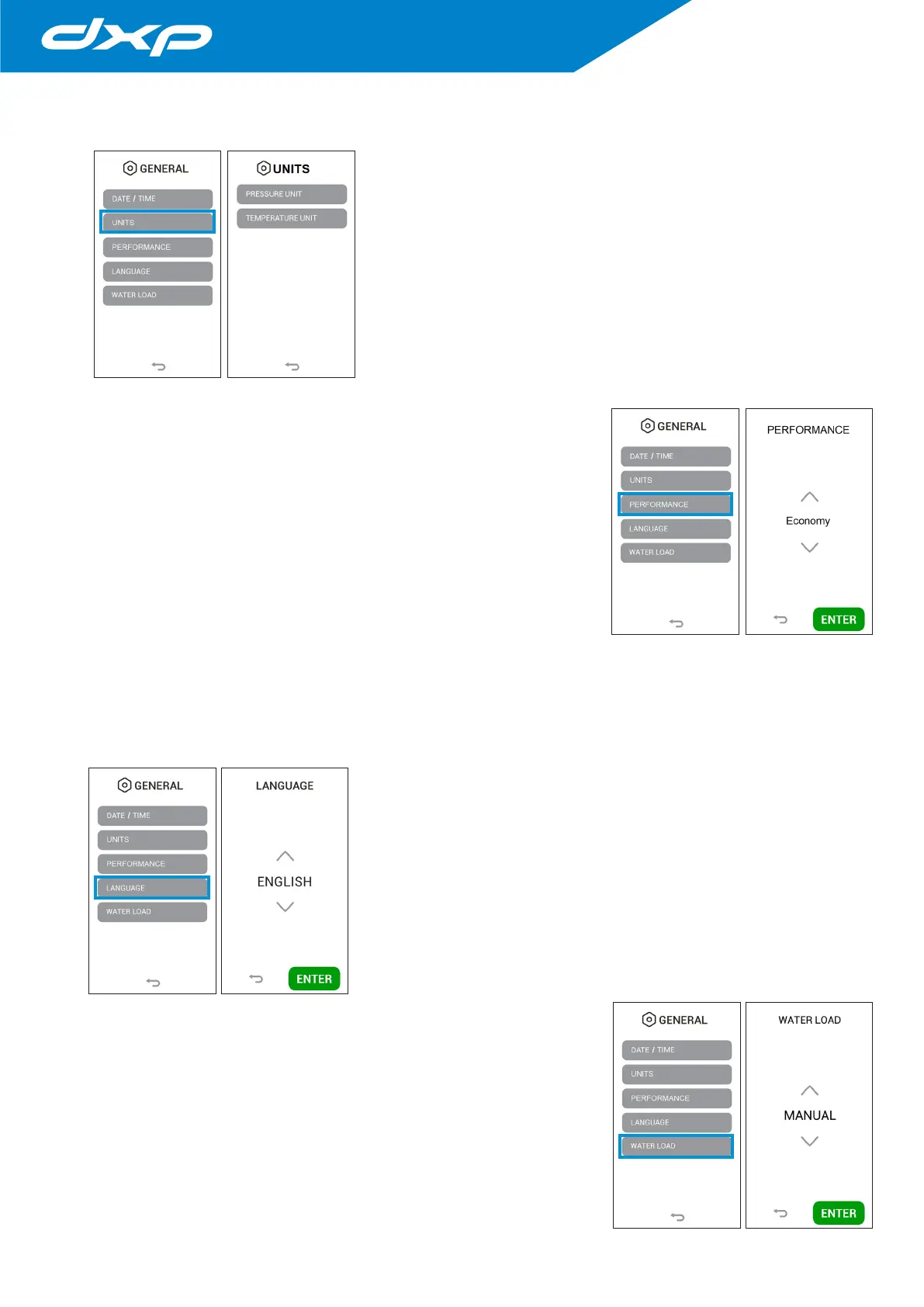
Pressing the UNITS button you access on the pressure measure unit menu. In
this menu it is possible select the pressure and temperature measure unit to be
displayed.
Pressure unit modification: it is possible modify the pressure unit by clicking
the PRESSURE UNIT button. The available formats are as follows:
• PSI;
• bar.
Temperature unit modification: it is possible modify the temperature unit by
clicking the TEMPERATURE UNIT button. The available formats are as follows:
• Celsius degrees (°C);
• Fahrenheit degrees (°F).
4.8.1.c Performance modification
By pressing the PERFORMANCE button you access a menu which it is
possible to modify the setting according to the type of use.
The available settings are:
ECONOMY: dedicated setting for those who perform 1 or 2 cycles a day. The
chamber is heated only when a cycle is started, at the end of the cycle the heating
is deactivated, minimizing energy consumption.
In this mode, as the chamber is not pre-heated, the cycle can last longer and can
consume more water.
AUTO KEEP WARM: setting indicated for those who perform several cycles per
day and/or want to optimize device performance. With this setting the chamber
remains heated at an intermediate temperature in waiting to run new cycles. This
avoids pre-heating times at each start of the cycle.
MANUAL KEEP WARM: setting indicated for each type of use.
With this setting, when the device is switched on and at the end of each cycle, a message appears on the display which
invites the operator to indicate what he/she intends to do next. When switched on, it asks if you want to run the Vacuum
Test (YES / NO), at the end of the cycle it asks if you want to keep the chamber heated (YES / NO). In this case, in based on the
expected workload and your needs, you have the option to choose how to optimize the use of the device.
4.8.1.d Language modification
Pressing the LANGUAGE button you access on language menu. In this menu it is
possible select the language to be visualized.
Pressing the ENTER button the data is confirmed and the screen return to the
general settings menu.
4.8.1.e Water load modification
Pressing the WATER LOAD button you access on the water load menu. In this
menu it is possible to activate the automatic water loading mode in presence of
an external demineralization system (optional).
Pressing the ENTER button the data is confirmed and the screen return to the
general settings menu.


 To Next Page