30
Installation
4.8.2 Operator menu
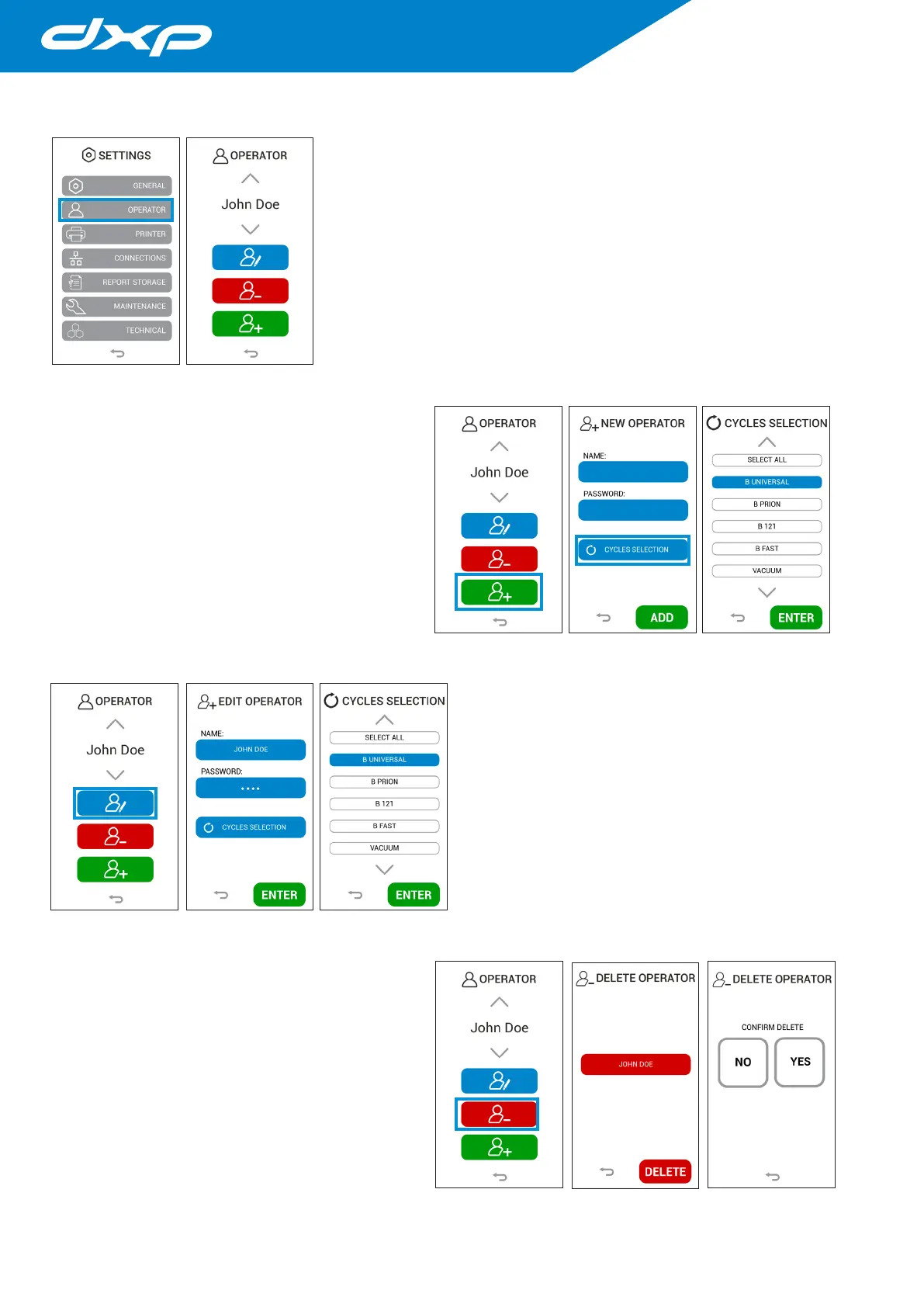
The OPERATOR menu allows to manage the operators and modify the operators
name, password and the cycles they can use.
4.8.2.a Create a new operator
Pressing the green button you access on the new operator
menu. In this menu it is possible create a new operator to be
selected on autoclave.
In this menu you will have to write the name of the operator,
their password and the cycles they can perform.
Pressing the ADD button the data is confirmed and the
screen returns to the operator menu.
4.8.2.b Modification of an existing operator
Pressing the blue button you access on the operator
modification menu. In this menu it is possible to modify an
existing operator, than you can modify the operator name,
their password and the cycles they can perform.
Pressing the ENTER button the data is confirmed and the
screen returns to the operator menu.
4.8.2.c Delete an existing operator
Pressing the red button you access on the delete operator
menu. In this menu it is possible delete an existing operator.
Pressing the DELETE button a new window appears to
confirm the elimination. Pressing the YES button the data
are removed and the screen return to the delete operator
menu.



 To Next Page