28
Installation
4.8 Settings menu
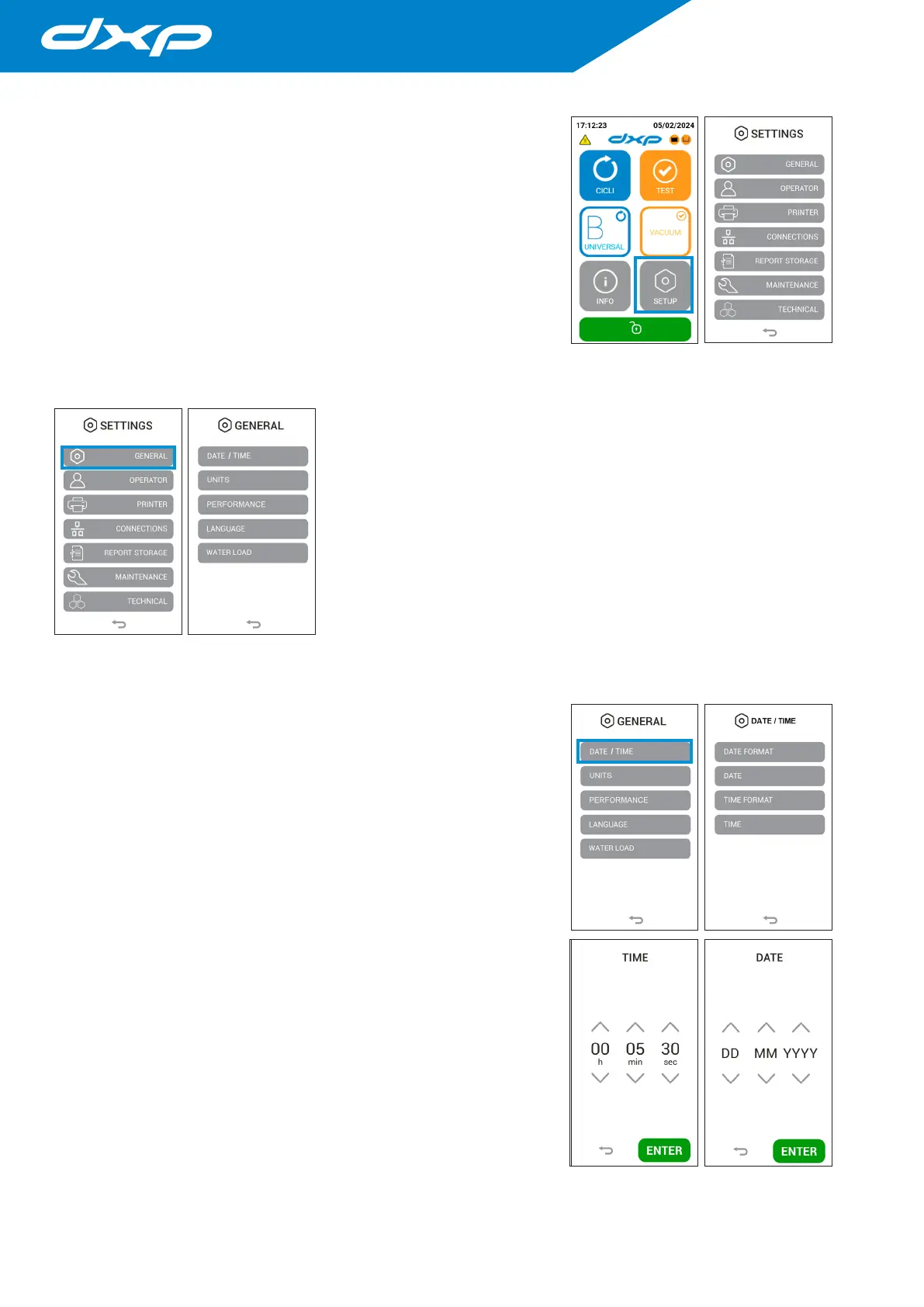
The SETTINGS menu allows to manage the settings of the different autoclave
options, connections with printers and ethernet.
In this menu you can also manage the storage of reports on the device and all
the advanced features relating to maintenance and technical assistance.
4.8.1 General settings
The GENERAL settings menu allows to manage the settings of:
• date/time modification and their format;
• temperature / pressure measure unit;
• language.
The set parameters will also appear in the cycle report.
4.8.1.a Date and time modification
Pressing the DATE / TIME button you access on the date format menu. In this
menu it is possible to select the date format to be displayed.
Date format modification: it is possible modify the date format by pressing the
DATE FORMAT button.
The available formats are as follows:
• DD-MM-YYYY;
• MM-DD-YYYY;
• YYYY-MM-DD.
Date modification: it is possible modify the date by clicking the DATE button.
Choose the correct date.
Time format modification: It is possible modify the time format by clicking
the TIME FORMAT button.
The available formats are as follows:
• 24 H;
• 12 H.
Time modification: It is possible modify the time by clicking the TIME button.
Choose the correct time according to your time zone.


 To Next Page