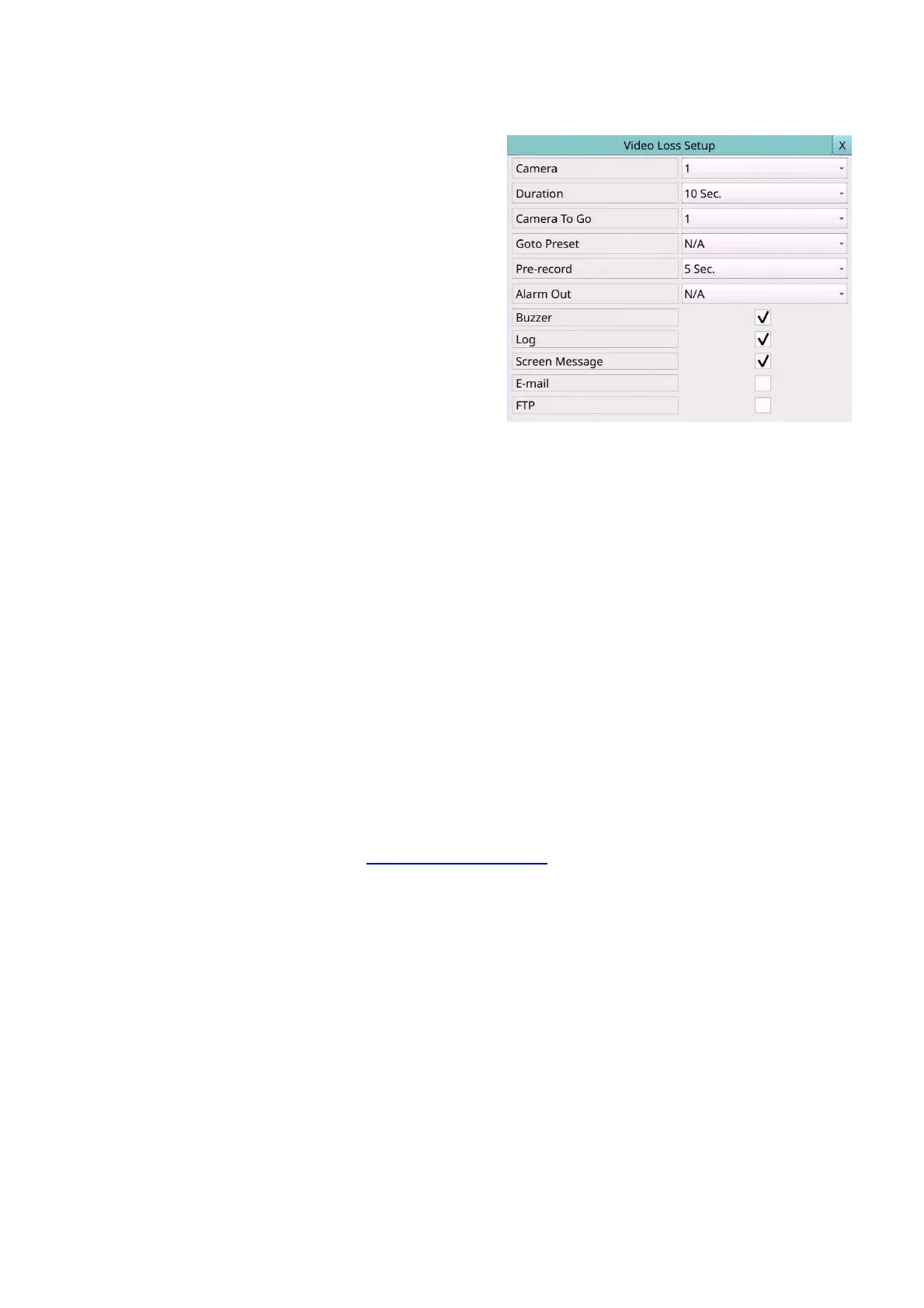
6.1.3 Video Loss Setup
In Camera Setup, press Video loss settings..
to call up Video Loss Setup of the selected
camera to set up. The Video Loss Setup
allows the administrator to define how the
system responds to the detected video loss
for the camera.
The general operations are as below:
Mouse: Click in the respective item
Select the items to set.
X (Mouse: Left Click X or Right Click to
leave)
Press this button to escape from this screen, and return to Camera Setup display. If
the contents have been modified, a Save dialog will be shown to ask the user to save
the changes, press YES to exit and save, CANCER to exit without saving.
Following is a brief description for each item and its specific operations:
Camera – Press the Numeric to select the camera.
Duration – response duration to define at most how long (in seconds) the Alarm Out
relay and the Buzzer will keep being triggered after video loss is detected for this
camera. However, the Alarm Out relay and the Buzzer will be reset immediately once
the camera returns to normal. The value (3 seconds - 60 minutes, discrete, ‘-‘ for
‘Forever’).
Camera to go – the camera to go to the preset position in next field after video loss is
detected for this camera. “Camera to go” camera must be a PTZ camera.
Goto Preset – to define the preset position to go to for the “Camera to go” Camera in
last field if video loss is detected for this camera. For more details about preset
locations, please refer to Section 5.6. PTZ Control.
Pre-record – to define how long before video loss is detected this camera shall be
intensively recorded at Pre-record IPS. Please note that the actual pre-record time
may be shorter than the value set if the total size of the pre-record pictures exceeds
the pre-record buffer size of the system.
Alarm Out – to define which Alarm Output will be triggered when this event is
triggered.
Buzzer – to activate the internal Buzzer or not when video loss of this camera is
detected.
Log – to log to event logs or not.
Screen Message – to display the event message on the screen or not.
E-mail – to send the event e-mail to remote station or not. The e-mail will be sent to
the predefined receivers at the moment when the event is triggered.
FTP – to send the recorded event video/audio files to FTP server or not.



 To Next Page