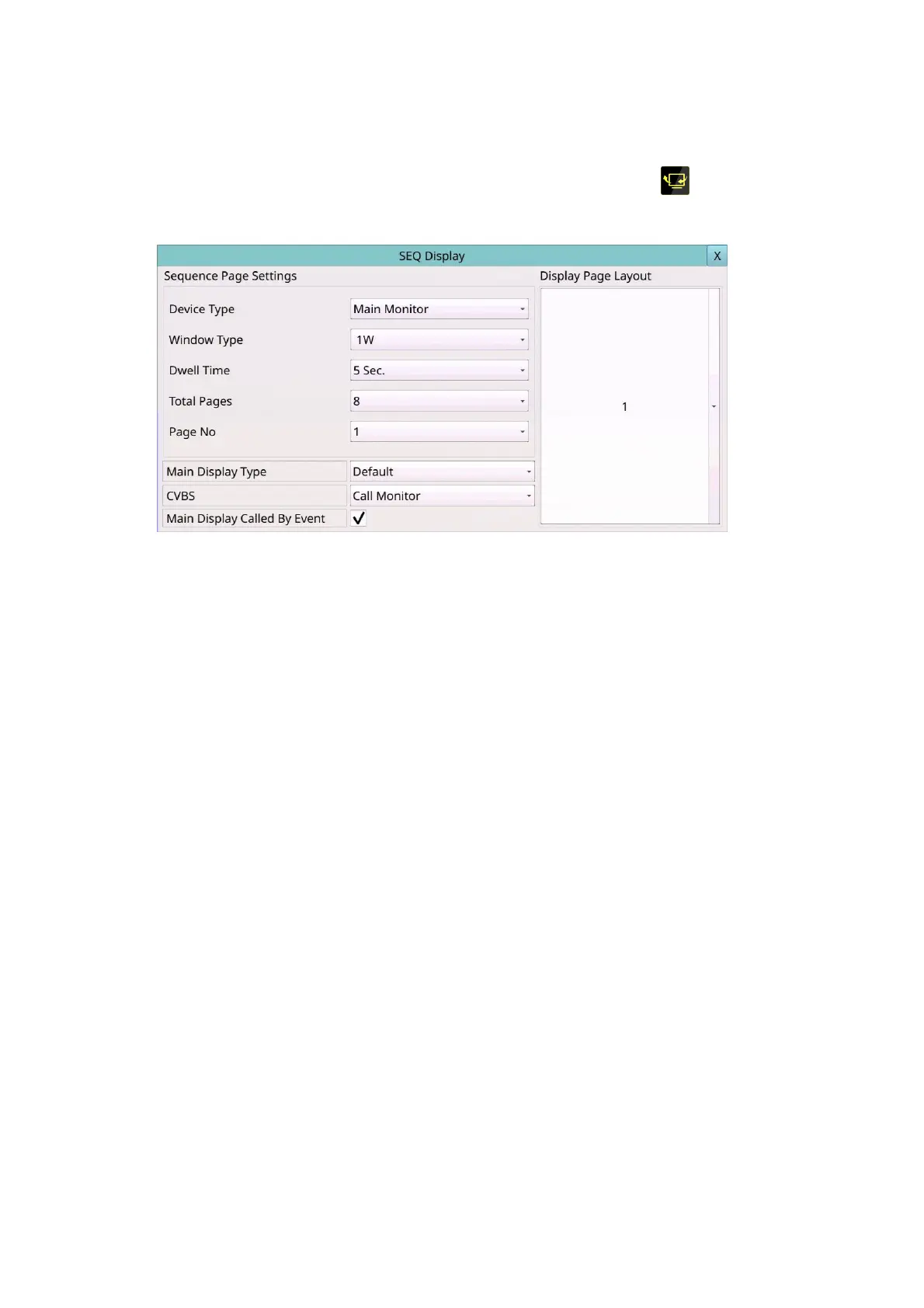
6.3 Main/SEQ Display Setup
Left-click the mouse to select the Main/SEQ Display (Mouse: ) In Setup Menu
display, the SEQ Display Setup will be shown.
The Main/SEQ Display Setup allows the administrator to define the display pages in SEQ
Display for main monitor and call monitor. Please note that Call Monitor supports 1/4
split window display.
The general operations are as below:
Mouse: Click in the respective item
Select the items to set.
X (Mouse: Left Click X or Right Click to leave)
Press this button to escape from this screen, and return to Setup Menu display. If the
contents have been modified, a Save dialog will be shown to ask the user to save the
changes, press YES to exit and save, CANCER to exit without saving.
Following is a brief description for each item and its specific operations:
Device Type – select to set Main Monitor or Call Monitor.
Window Type – select to set the split window.
Dwell Time – the dwell time (3 ~ 60 seconds) for each page of this display type.
Total Pages – total pages for this SEQ Display Type. The maximum number varies
according to the display type.
Pages No – to change the current page for this SEQ Display Type.
Display Page Layout – used to set the camera in each viewing window for each page
of this SEQ Display Type.
In Display Page Layout, the split window display for the current page is shown. Press ▼
buttons to change the camera for the current page.



 To Next Page