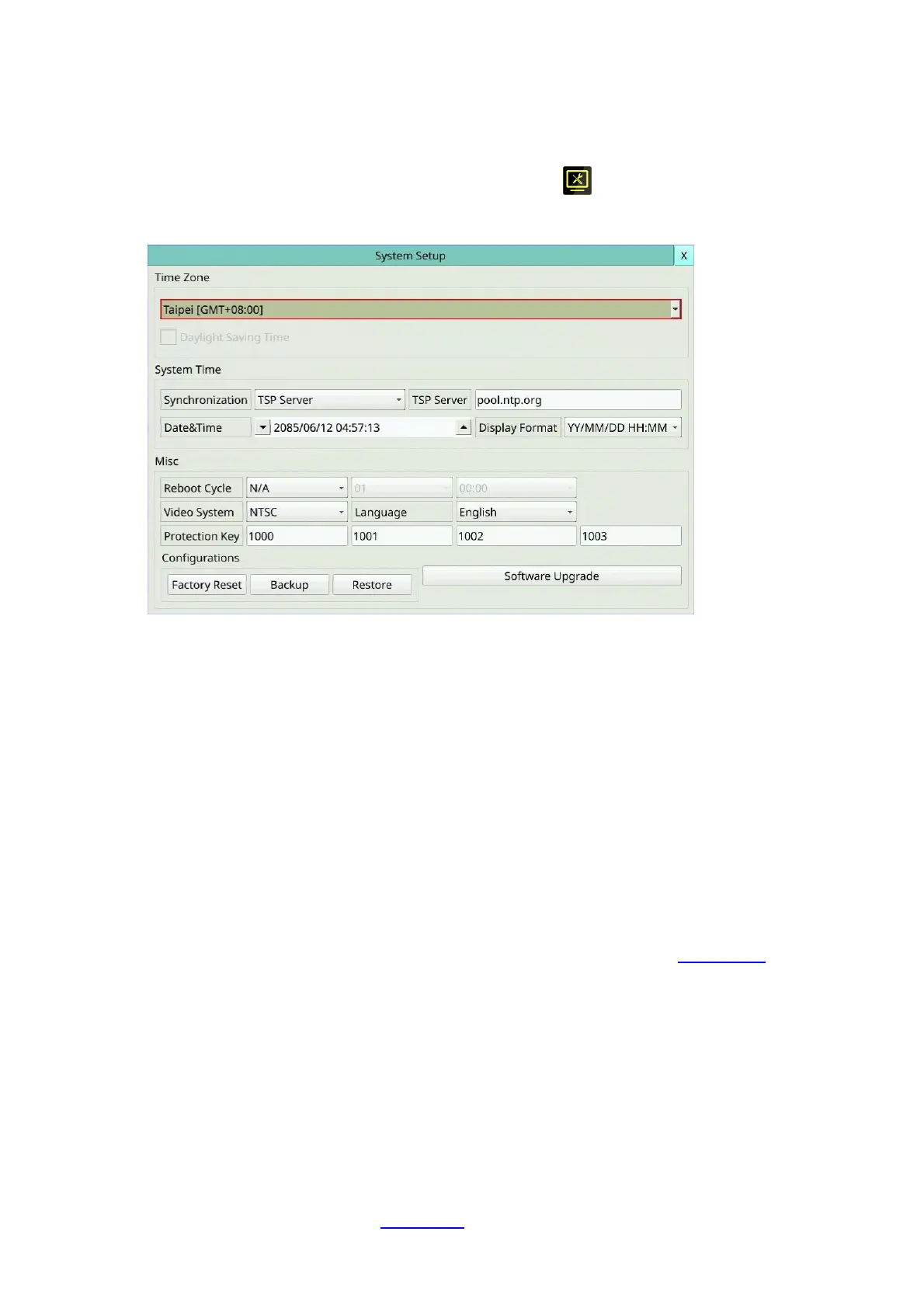
6.7 System Setup
Left-click the mouse to select the System (Mouse: ) In Setup Menu display, the
System Setup will be shown.
The System Setup allows the administrator to set the system time, time zone, time
synchronization, language, etc.
The general operations are as below:
Mouse: Click in the respective item
Select the items to set.
X (Mouse: Left Click X or Right Click to leave)
Press this button to escape from this screen, and return to Setup Menu display. If the
Save dialog is shown, press YES to exit and save, CANCEL (Mouse: Right Click) to exit
without saving.
Following is a brief description for each item and its specific operations:
Time Zone – Select the time zone for the system. Please refer to Appendix A for the
time zone table.
Daylight Saving Time – Mouse Left click to check/uncheck this item. The default
value is set by selecting a different time zone, but the user may check/uncheck this
item if the default setting is checked.
Synchronization – time synchronized with TSP Server or not. Please note that “Local
Server” means this DVR is used as TSP server.
TSP Server – TSP (Time Synchronization Protocol) server name if Time
Synchronization is set to “TSP Server”. The system will try to do time synchronization
with the specified TSP server at the system preset interval. Please follow the Text
Input method described in Section 4.1 to modify this item.



 To Next Page