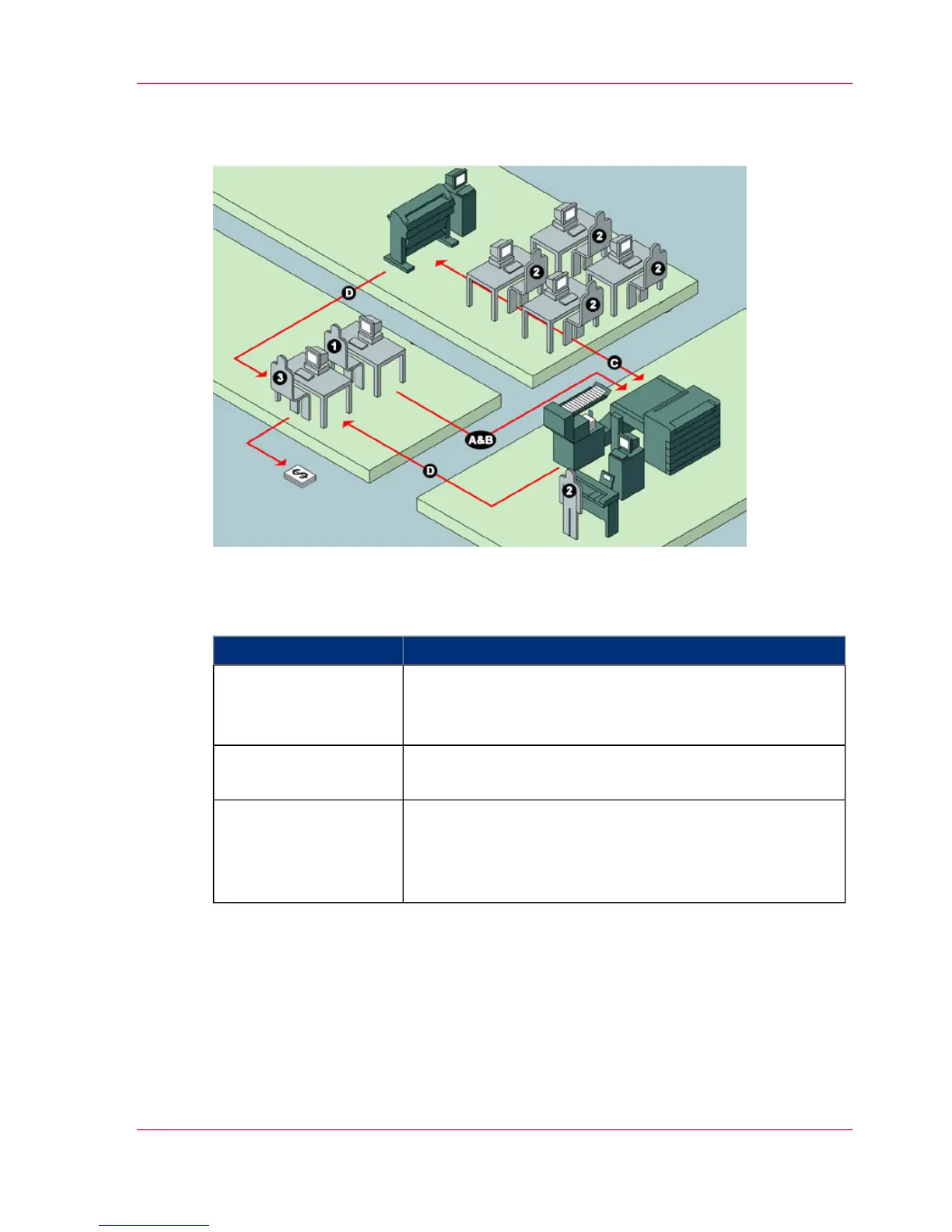
Illustration
User roles and tasks in Océ Account Center
User roles and tasks in Océ Account center#
TasksUsers
A) Create, manage and delete the account dialog.
B) Publish the account dialog to the Océ TC4 Power
Logic
®
controller.
1) Administrator
C) Use the dialog of Océ Account Logic to specify the ac-
count information for each scan-to-file job.
2) Users
D) Retrieve and use the account information of the scan-
to-file jobs that is stored on the Océ TC4 Power Logic
®
controller. The log data serves as input for the accounting
reports and invoices.
3) Bookkeeper
Access to Océ Account Logic
Provided you have a valid license, you can access the application via the vertical icon
toolbar in the Océ TC4 Power Logic
®
controller application.
Actions to access Océ Account Logic.
■
Access the Océ TC4 Power Logic
®
controller application.
Chapter 7 - Accounting software: Océ Account Center 159
An overview of Océ Account Center



 To Next Page