20
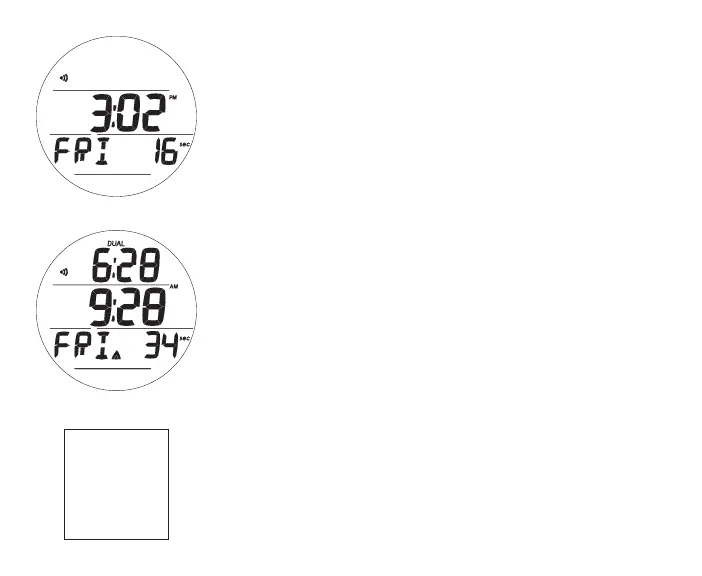
MAIN (Default) TIME, information includes (Fig. 4A/B):
> Alarm (speaker) icon, if Daily Alarm is set on
> Dual Time (hr:min) with DUAL icon, if set on
> Main (Default) Time (hr:min_sec) with AM (or PM) icon
> Away Time icon (up arrow) meaning Away is selected as
Main Time, blank if Home is Main
> Day of Week graphic (MON, TUE, etc.)
> Battery icon, if a Low Battery
> TLBG, if any after NORM/FREE dives
• A (< 2 sec) - to access the Watch Menu displaying the first
selection, Watch ALT.
• M (< 2 sec) - to access the Watch Menu displaying the last
selection, Set T.
• M (2 sec) - to access the NORM Surface Main screen.
• S (< 2 sec) - to silence the Daily Alarm.
• L (press) - to activate the Backlight.
WATCH MENU
A (< 2 sec) - to step forward through selections 1 at a time.
A (hold) - to scroll forward through selections (8 per second).
S (< 2 sec) - to access the selection displayed.
M (< 2 sec) - to step back through selections 1 at a time.
M (2 sec, any time) - to revert to Main.
No button action (2 min) - revert to Main.
L (press) - to activate the Backlight.
Fig.4A-WATCHMAIN
(Homeasdefault)
Fig.4B-WATCHMAIN
(Awayasdefault,Dualon)
>ALT<
>DUALTIME<
>CDT<
>CHRONO<
>DAILYALARM<
>SETT<



 To Next Page