50
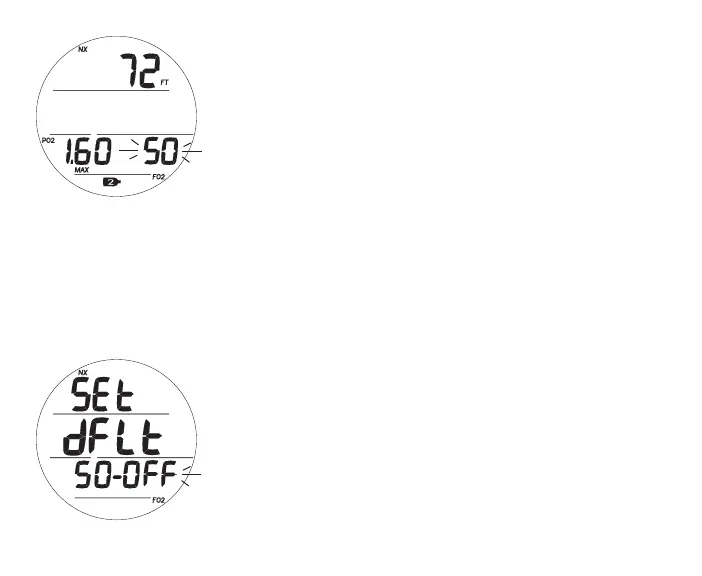
Fig.43-SETFO2GAS2
Fig.44-SETFO2DEFAULT
Set FO2 Gas 2, information includes (Fig. 43):
> Graphic SEt if Air; or Max Depth allowed for the PO2
alarm set with FT (or M) and NX icons if Nitrox
> Gas 2 (tank) icon
> PO2 alarm value set (ATA) with PO2 and MAX icons, blank
if Air
> Graphic Air, or numeric FO2 Set Point value if Nitrox,
flashing, with FO2 icon
• A (hold) - to scroll upward through Set Points at a rate of
8 per second from Air (default) to 21 through 100 (%) in
increments of 1%.
> The scroll will stop when A is released, or at 32, 50, and 80% (even if A
is held depressed). Pressing and holding A again will resume the scroll
through 100, then stop at Air or 21%.
• A (< 2 sec) - to step upward through Set Points one at a
time.
• M (< 2 sec) - to step back through Set Points one at a time.
• S (< 2 sec) - to save the setting and access Set FO2 Default
if FO2 1 or 2 is Nitrox or Set F Lead-in if both are Air.
• S (2 sec) - to revert to Set FO2 Gas 1.
Set FO2 Default, information includes (Fig. 44):
> Graphics Set, dFLt, and 50 -
> Graphics OFF (or OFF) flashing
> NX and FO2 icons



 To Next Page