72
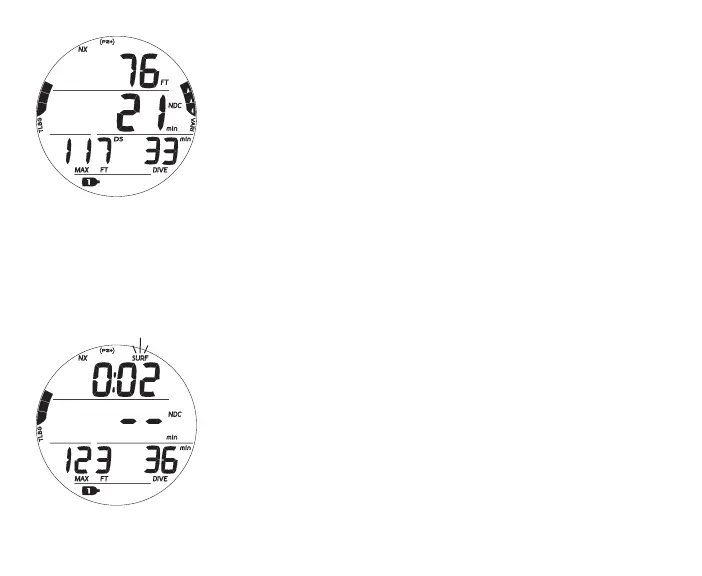
Fig.73-NODECOMAIN
NO DECO DIVE MAIN, information includes (Fig. 73) -
> Current Depth with FT (or M) icon
> DTR (min) with NDC (or O2) and min icons
> Max Depth with MAX and FT (or M) icons
> EDT (Elapsed Dive Time) with DIVE and min icons
> TLBG with icon
> VARI while ascending
> NX, (PZ+), CF, Gas, DS icons - those that apply
• A (< 2 sec) - to access ALTs.
• A (2 sec) - to access Deep Stop Preview, if triggered.
• M (2 sec) - to access Gas Switching.
• S (< 2 sec) - to acknowledge alarms.
• L (press) - to activate Backlight.
Upon ascending to 2 FT (0.6 M) during a dive, Surface Interval
time will be displayed with the SURF icon flashing for the first 10
minutes and NDC will be displayed as 2 dashes (Fig. 74).
• A (< 2 sec) - to access Dive ALTs.
• M (2 sec) - to access Gas Switching.
• L (press) - to activate Backlight.
>> After 10 minutes elapse, operation will revert to Surface Mode and full access
given to the NORM Surface Menu items.
>> If a descent is made to 5 FT (1.5 M) for 5 seconds, the dive will be continued.
Surface time will not be added to Dive Time.
Fig.74-NODECOMAIN
(during<10minonsurface)



 To Next Page