73
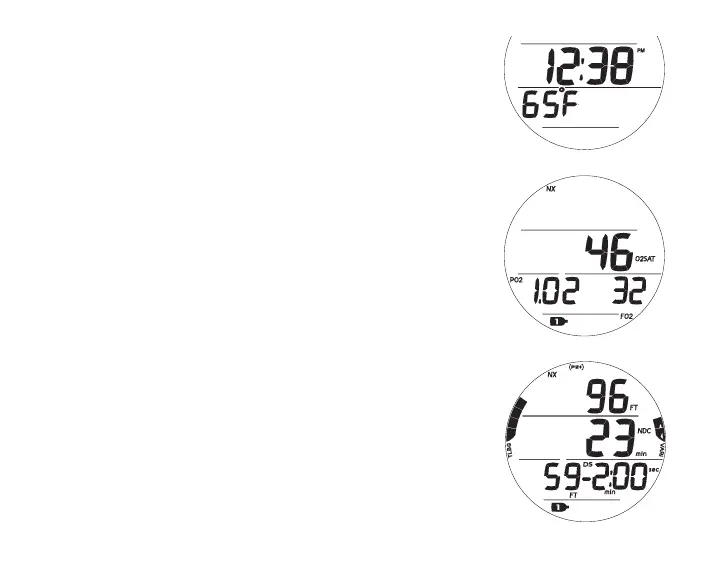
Fig.75-NODECOALT1
Fig.76-NODECOALT2
No Deco Alt 1, information includes (Fig. 75) -
> Time of Day (hr:min), with AM (or PM) icon if 12 Hour
Format, no icon if 24 Hour Format
> Temperature with ° icon and graphic F (or C)
• A (< 2 sec) - to access ALT 2 (if Nitrox).
• Revert to Main in 5 sec, if A not pressed.
• L (press) - to activate Backlight.
No Deco Alt 2 (only if Nitrox), information includes (Fig. 76) -
> NX icon
> % O2 with O2SAT icons
> Current PO2 value (ATA) with PO2 icon
> FO2 Set Point for Gas in use with FO2 icon
> Gas (tank) icon, gas in use (1 or 2)
• 5 sec or A (< 2 sec) - to revert to Main.
• L (press) - to activate Backlight.
Deep Stop Preview, information includes (Fig. 77) -
> same as Main except Max Depth and EDT replaced by -
> Stop Depth with FT (or M) icon, DS icon, and Stop Time as
2:00 with min and sec icons
• Revert to Main after 5 sec or A (< 2 sec).
• L (press) - to activate Backlight.
Fig.77-DSPREVIEW



 To Next Page