38
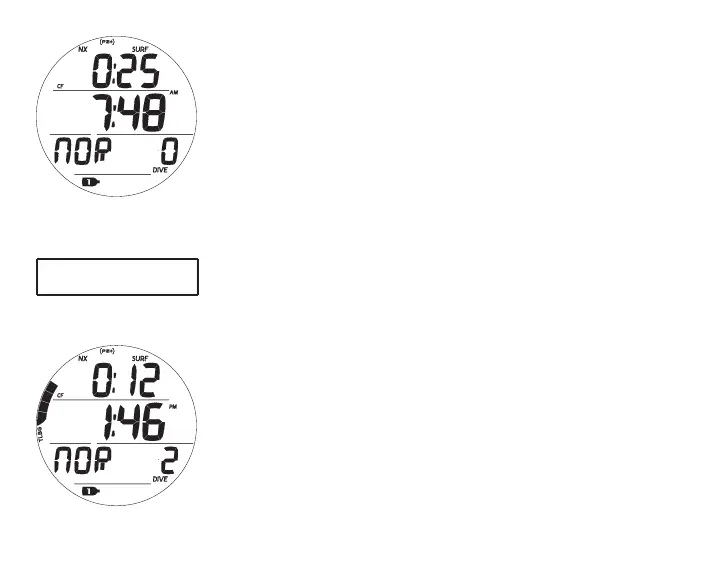
NORM SURF MAIN, information includes (Fig. 28):
> Surface Interval time (hr:min) with SURF icon; if no dive yet,
this is time since activation
> Time of Day (hr:min) with AM or PM icon if 12 Hour
Format; no icon if 24 Hour Format
> Graphic NOR
> Dive number with DIVE icon, up to 24 for that operating
period (0 if no dive made yet)
> NX icon, if FO2 is set for Nitrox
> (PZ+) icon, if selected, no icon if DSAT is selected
> CF icon, if Conservative Factor is set On
> Gas 1 icon, default in Surface Mode
> TLBG with icon, if any after a NORM or FREE dive
> Battery icon, if voltage is low
• A (< 2 sec) - to access ALT 1.
• A (hold) - to scroll forward through Menu items.
• M (< 2 sec) - to access SN.
• L (press) - to activate Backlight.
Upon surfacing during dives, the Dive Main will remain on
display for the first 10 minutes with Surface Interval time (SI) in
place of Depth after which the post dive Surface Main will be
displayed (Fig. 29).
Fig.29-NORMSURFMAIN
(>10minafterdive2)
Fig.28-NORMSURFMAIN
(nodiveyet)
TimeofDaydoesnotdisplay
Secondsindivemodes.



 To Next Page