40
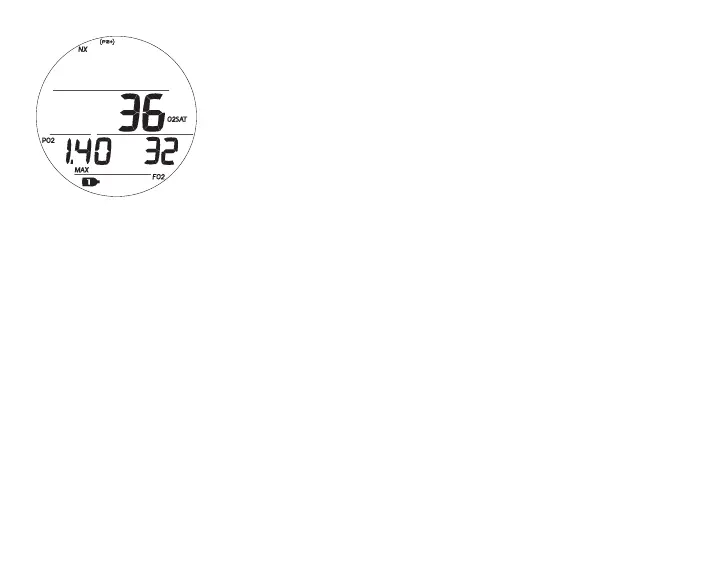
NORM SURF ALT 3, information includes (Fig. 32):
> Current O2 (%) with O2SAT icon
> PO2 alarm value set (ATA) with PO2 and MAX icons
> FO2 set for Gas 1 with FO2 icon
> NX icon, if FO2 is set for Nitrox
> (PZ+) icon, if selected, no icon if DSAT is selected
> CF icon, if Conservative Factor is set On
> Gas 1 icon, default on surface
• A (< 2 sec) - to access Fly/Sat.
• A (hold) - to scroll forward through Menu items.
• M (< 2 sec) - to step back to ALT 2.
• L (press) - to activate Backlight.
FLY/SAT TIME
Time to Fly is a countdown timer that begins counting down from 23:50 to 0:00 (hr:min)
10 minutes after surfacing from a dive (NORM, GAUG, or FREE).
Time to Dsaturate, also a countdown timer, provides calculated time for tissue desaturation
at sea level taking into consideration the Conservation Factor setting. It also begins count-
ing down 10 minutes after surfacing from a dive (NORM or FREE), counting down from
23 to 10 (hr only), then 9:59 to 0:00 (hr:min).
When the SAT countdown reaches 0:00, which will generally occur prior to the FLY count-
down reaching 0:00, it will remain on the display until the FLY countdown reaches 0:00.
Fig.32-NORMSURFALT3
(onlyifNitrox)



 To Next Page