47
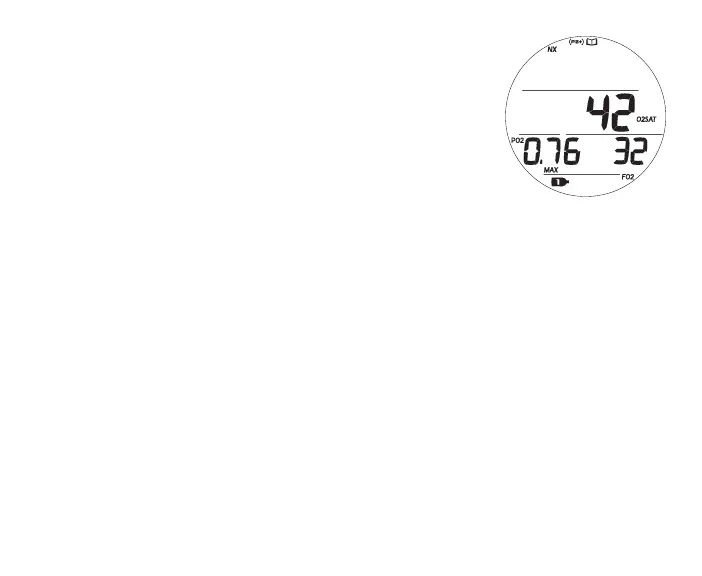
Log Data 3, information includes (Fig. 40):
> Log Mode (book) icon
> O2% at end of dive, 2 dashes if Violation Gauge Mode,
with O2SAT icons
> Highest PO2 (ATA) reached during the dive with PO2 and
MAX icons
> FO2 Set Point (or graphic Air) for Gas in use when dive
ended, with FO2 icon
> Gas 1 (or 2) icon, one in use when dive ended
> NX, (PZ+) icons - if they apply
• S (< 2 sec) - to revert to the Preview screen.
• S (2 sec) - to revert to the Data 2 screen.
• L (press) - to activate Backlight.
SET F MENU (NORM FO2)
Sequence >> FO2 Gas 1 >> FO2 Gas 2 >> 50% Default
When the FO2 50% Default is set Off, FO2 will remain set at the last FO2 Gas 1 Set Point
saved during that period of activation.
When the FO2 50% Default is set On and FO2 for Gas 1 is set for a numerical value, 10
minutes on the surface after that dive the FO2 Gas 1 will be displayed as 50 and further
dives will be calculated based on 50% O2 for oxygen calculations and 21% O2 for Nitro-
gen calculations (79% Nitrogen), unless FO2 Gas 1 is set before the dive.
Fig.40-LOGDATA3



 To Next Page