74
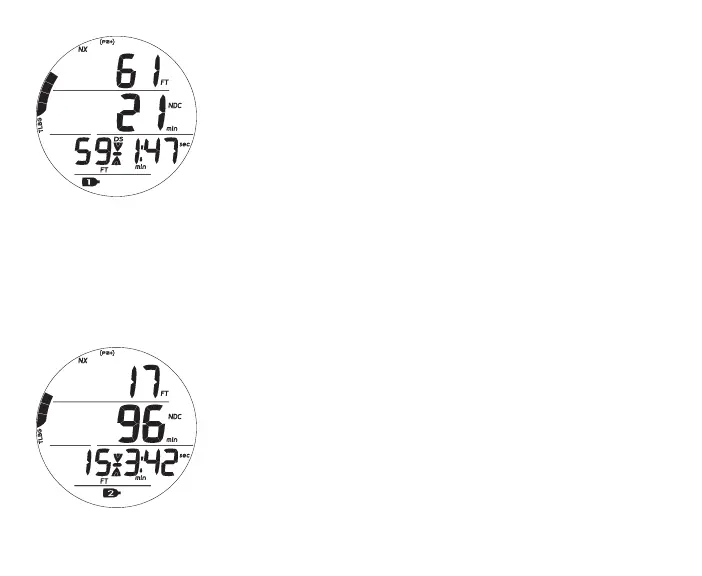
Fig.78-DSMAIN
Fig.79-SSMAIN
(On-Depth/Timeset)
DEEP STOP MAIN, information includes (Fig. 78) -
> Current Depth with FT (or M) icon
> DTR (min) with NDC (or O2) and min icons
> Stop Depth with FT (or M) icon
> Stop icon (arrows/bar) and DS icon
> Stop Time with min and sec icons, counting down
> TLBG with icon
> NX, (PZ+), CF, Gas icons - those that apply
• A (< 2 sec) - to access ALTs**.
• M (2 sec) - to access Gas Switching.
• S (< 2 sec) - to acknowledge alarms.
• L (press) - to activate Backlight.
** DS features up to 3 ALT displays which are similar to the No Deco Main, ALT1,
and ALT2 displays, respectively.
SAFETY STOP MAIN (On), information includes (Fig. 79) -
> Current Depth with FT (or M) icon
> DTR (min) with NDC (or O2) and min icons
> Stop Depth set with FT (or M) icon
> Stop icon (arrows/bar)
> Stop Time set with min and sec icons, counting down
> TLBG with icon
> NX, (PZ+), CF, Gas icons - those that apply
• A (< 2 sec) - to access ALTs**.



 To Next Page