94
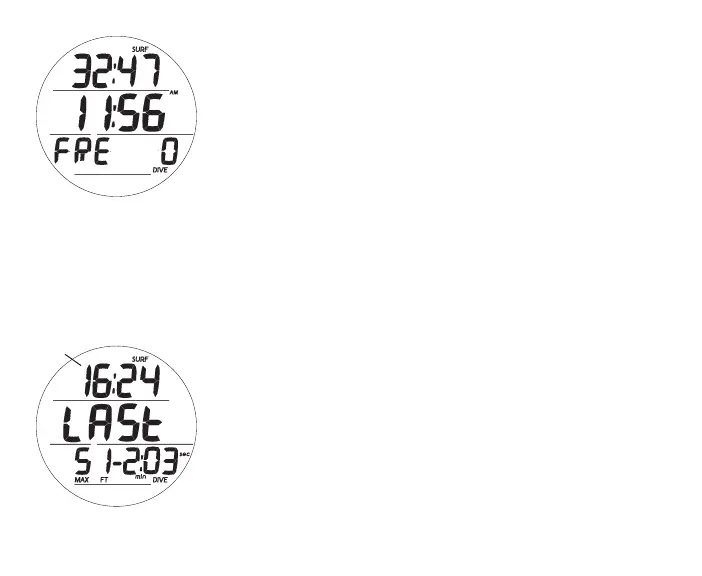
FREE SURF MAIN, information includes (Fig. 108):
> Surface Interval time (min:sec up to 59:59, then hr:min)
with SURF icon; if no dive yet, this is time since activation
> Time of Day (hr:min) with AM (or PM) icon
> Graphic FRE
> Dive number with DIVE icon, up to 99 for that operating
period (0 if no dive made yet)
> (PZ+), CF, Battery icons - if they apply
> TLBG with icon, if any after a NORM or FREE dive
• A (< 2 sec) - to access ALT 1.
• A (hold) - to scroll forward through Menu items.
• M (< 2 sec) - to access Set M Lead-in.
• L (press) - to activate Backlight.
Upon surfacing during dives, the Dive Main will remain on dis-
play for the first 1 minute (with SI in place of Depth) after which
the Surface Main will be displayed.
FREE SURF ALT 1, information includes (Fig. 109):
> SI (min:sec or hr:min) with SURF icon, prior to Last dive
> Graphic LAST, indicating data is for dive previously
conducted while still in FREE mode
> Max Depth of dive previously conducted while still in FREE
mode with MAX and FT (or M) icons
> EDT (min:sec or hr:min) with DIVE and min/sec icons
Fig.109-FREESURFALT1
(LastDiveData)
Fig.108-FREESURFMAIN
(nodiveyet)
prediveSI
(min:sec)



 To Next Page