45
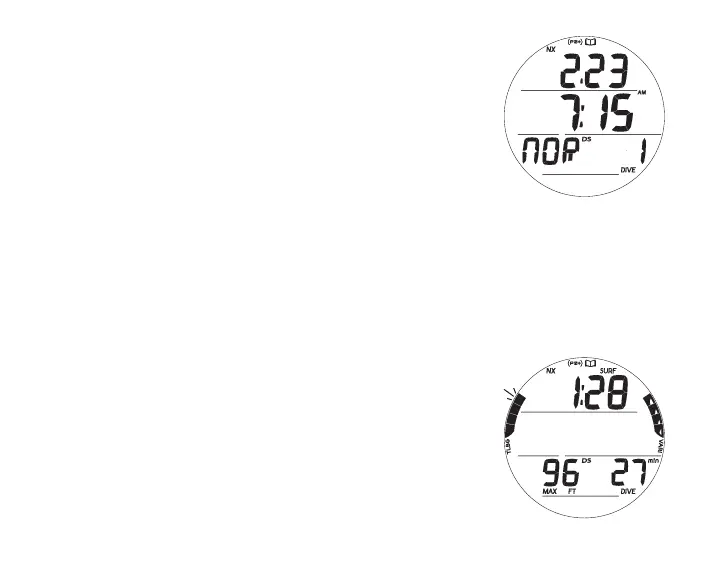
Log Preview, information includes (Fig. 37):
> Log Mode (book) icon
> Date (month.day or day.month), the dive was conducted; or
blank if none recorded
> Time dive began (hr:min) with AM (or PM) icon if 12 Hour
Format, no icon if 24 Hour Format; or graphic NONE
> Graphic NOR (or GAU or VIO or YET - )
> Dive number (1 to 24, 0 if no dive yet) with DIVE icon
> NX, (PZ+), CF, DS icons - those that apply
• A (< 2 sec) - to step through Preview screens from the most
recent to the oldest recorded.
• A (hold) - to scroll through Preview screens from the most
recent to the oldest recorded at a rate of 8 per second.
• M (< 2 sec) - to step through Preview screens in the
opposite direction.
• S (< 2 sec) - to access Data 1 for the dive Preview
displayed.
• S (2 sec) - to revert to the Lead-in screen.
• L (press) - to activate Backlight.
Log Data 1, information includes (Fig. 38A, B):
> Log Mode (book) icon
> Pre dive SI (hr:min), - : - - if no pevious dive that activation
period, with SURF icon
> Total Ascent Time (min) with TAT and min icons, if Deco
Fig.37-LOGPREVIEW
(afterNORMdive1)
Fig.38A-LOGDATA1



 To Next Page