107
7
Playback
Rotating images
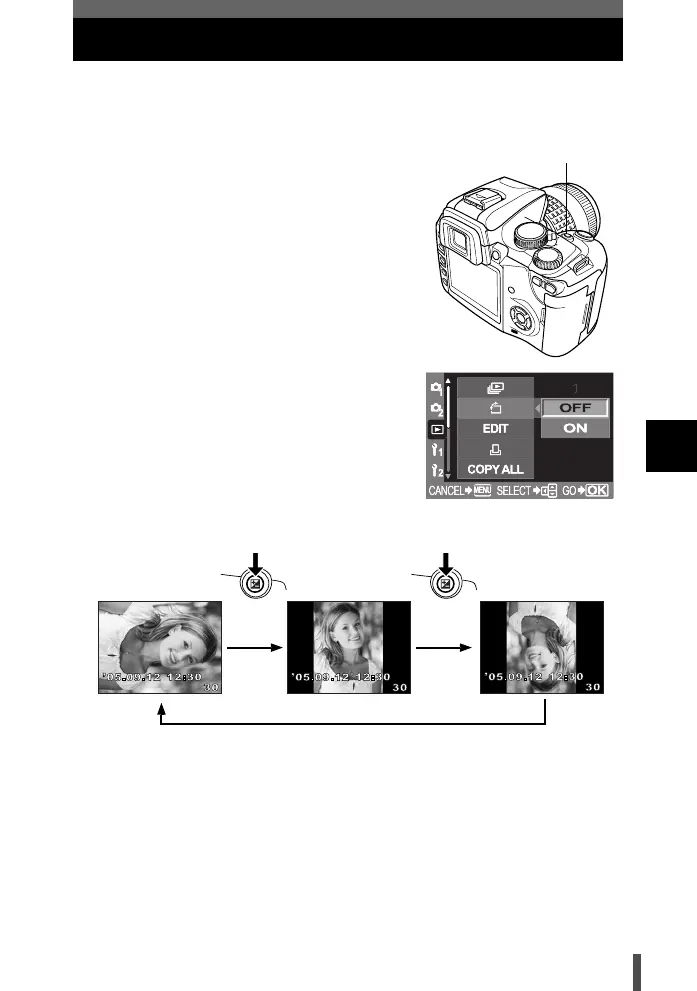
This function lets you rotate images and display them vertically on the monitor.
This is useful for viewing pictures that were taken with the camera held
vertically.
1 Menu [q] [y] [ON]
2 Press the i button.
3 Each time the F (exposure
compensation) button is pressed, the
image is rotated.
• The rotated image will be recorded on the
card.
9E9
F button
Original image
before rotating
s0004_e_Advanced.book Page 107 Tuesday, September 27, 2005 4:15 PM













 To Next Page