121
8
Customizing the settings/functions of your camera
AEL/AFL mode
Functions performed when the shutter button is pressed halfway
• AF start
• Focus lock
• AE lock
can be assigned to the AEL button.
Examples:
• After locking focus, you lock exposure value to take a picture.
• After locking exposure value, you lock focus to take a picture.
• After locking exposure value and focus, you take a picture whenever the
opportunity arises.
You can select modes in S-AF, C-AF and MF (g P. 70).
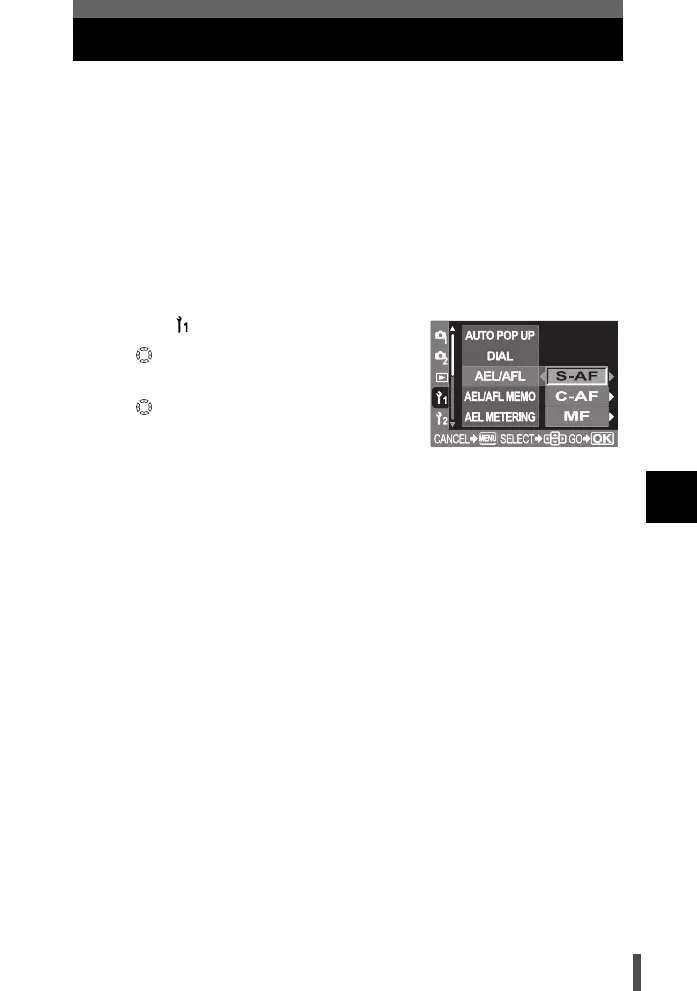
1 Menu [] [AEL/AFL]
2 Use to select the focus mode.
[S-AF] / [C-AF] / [MF]
3 Use to select the AEL/AFL mode.
[S-AF] Selects from mode 1- mode 3.
[C-AF] Selects from mode 1- mode 4.
[MF] Selects from mode 1- mode 3.
4 Press the i button.
s0004_e_Advanced.book Page 121 Tuesday, September 27, 2005 4:15 PM













 To Next Page