69
5
Focusing functions
AF frame selection
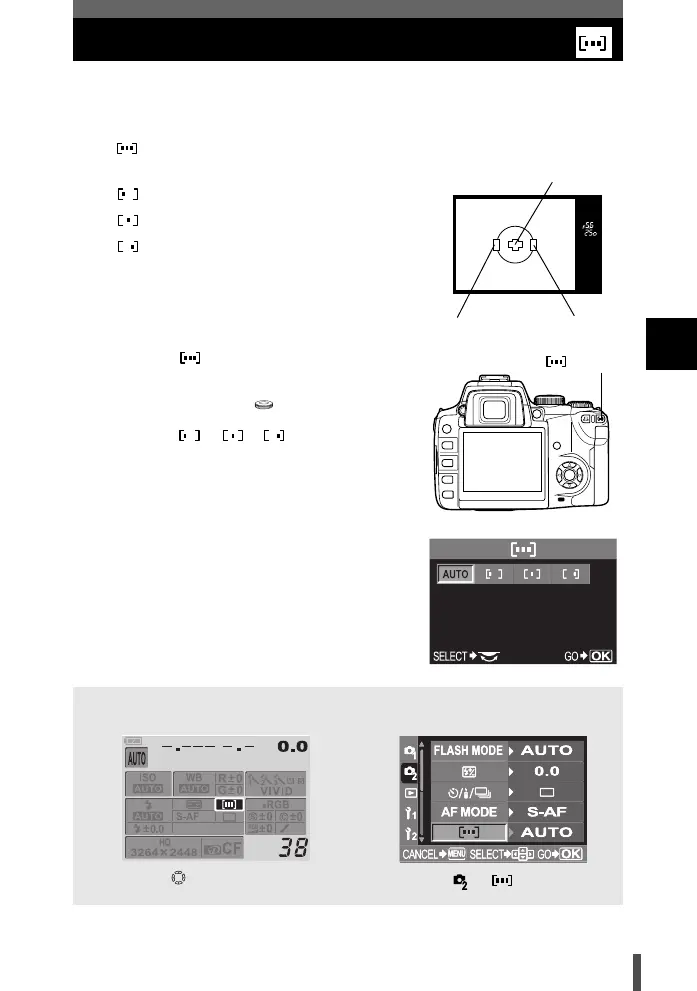
Normally, the camera measures the distance to the subject using the 3 AF
frames in the viewfinder and selects the most appropriate point. This function
allows you to select only one AF frame.
(AUTO)
Focuses using the 3 AF frames.
Focuses using the left AF frame.
Focuses using the center AF frame.
Focuses using the right AF frame.
1 Press the (AF frame selection)
button.
2 Use the control dial to set.
AUTO / / /
3 Press the shutter button all the way to
take the picture.
Control panel setting procedure Menu setting procedure
Viewfinder
Center AF frame
Left AF frame
Right AF frame
button
i AF frame i
Menu []Setting
s0004_e_Advanced.book Page 69 Tuesday, September 27, 2005 4:15 PM













 To Next Page