113
7
Playback
Copying images
This function lets you copy images to and from the xD-Picture Card and
CompactFlash or Microdrive. This menu can be selected if both cards are
inserted. The selected card is the copying source.
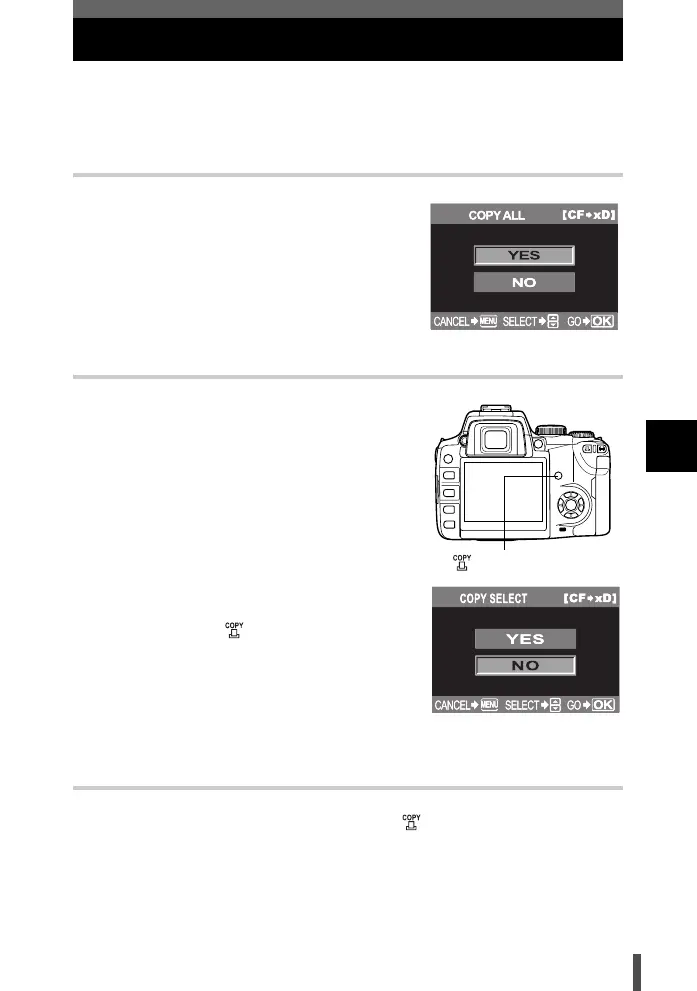
Copying all the frames
1 Menu [q] [COPY ALL]
2 Press the d button.
3 Use ac to select [YES].
4 Press the i button.
Copying selected frames
1 Press the i button during playback.
2 When the image selection screen is
displayed, use bd to select the images
you want to copy and press the i
button.
• The selected images will be shown with red
frames.
• To cancel your selection, press the i button
again.
3 After you have selected the images to
copy, press the (copy) button.
4 Use ac to select [YES]. Press the i
button.
• To finish copying, press the MENU button.
• It is possible to copy selected frames during
index display.
Single-frame copy
1 Select the desired frame and press the button.
2 Use ac to select [YES]. Press the i button.
button
s0004_e_Advanced.book Page 113 Tuesday, September 27, 2005 4:15 PM













 To Next Page