123
8
Customizing the settings/functions of your camera
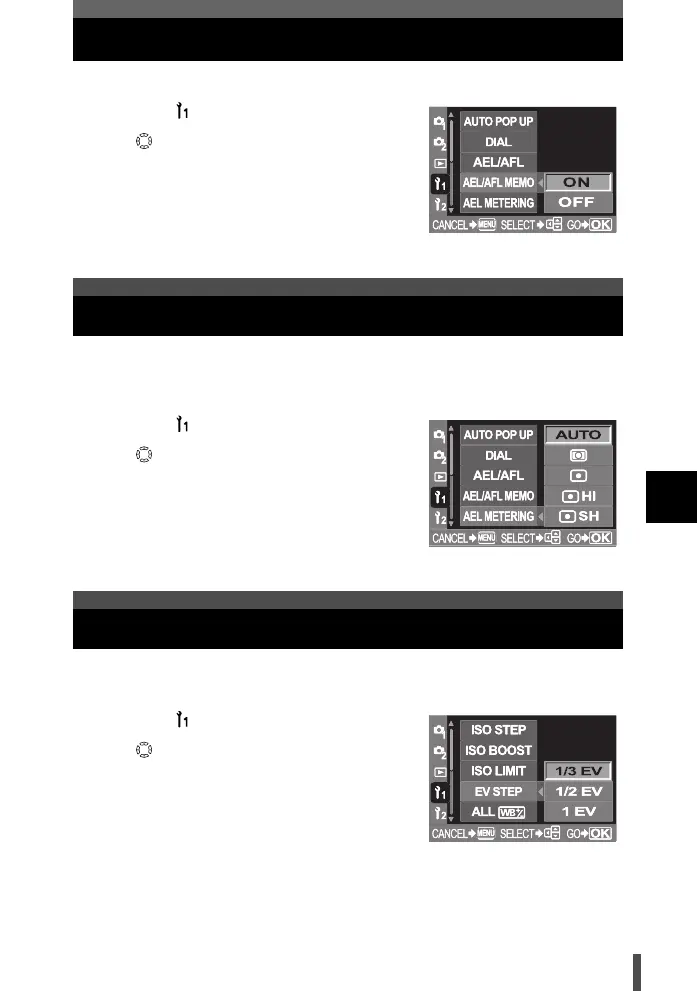
AEL/AFL memo
Pressing the [ button toggles the AE lock between on and off.
1 Menu [] [AEL/AFL MEMO]
2 Use to select [ON] or [OFF].
3 Press the i button.
Set the metering mode before using the [ button to lock the exposure.
This allows the camera to automatically apply the selected metering mode
when the AE lock function is used (g P. 81).
1 Menu [] [AEL METERING]
2 Use to set.
[AUTO] / [4] / [5] / [5 HI] / [5 SH]
3 Press the i button.
This allows you to change the EV step for exposure parameter setting, such
as shutter speed, aperture value or exposure compensation value, etc.
1 Menu [] [EV STEP]
2 Use to set.
[1/3EV] / [1/2EV] / [1EV]
3 Press the i button.
AEL metering
EV step
s0004_e_Advanced.book Page 123 Tuesday, September 27, 2005 4:15 PM













 To Next Page