98
Playback
7
Single-frame playback
There are several different ways to view and edit images. However, before
using any of these functions, follow step 1 below.
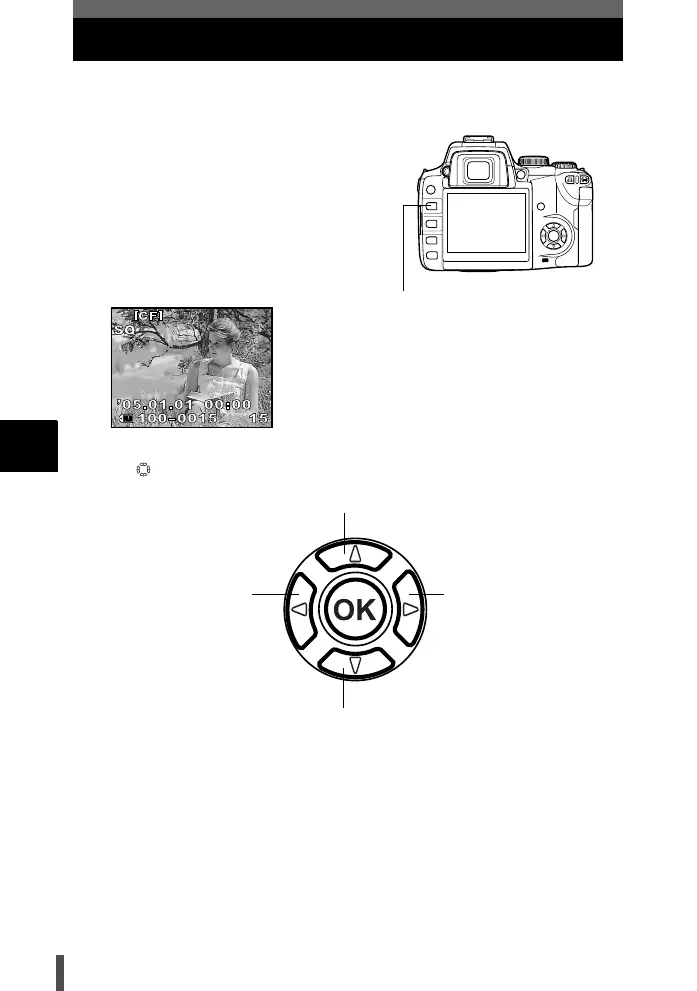
1 Press the q (playback) button.
• The monitor turns off after about 1
minute if no operations are
performed. After about 1 hour without
being used, the camera will turn off
automatically. Turn on the camera
again.
2 Use to select images you want to view.
• To exit the playback mode, press the q button.
• Pressing the shutter button halfway resumes the shooting mode.
q button
The last recorded image appears.
a Displays the frame that is stored 10 frames back.
c Displays the frame that is stored 10 frames ahead.
d Displays the next
frame.
b Displays the previous
frame.
s0004_e_Advanced.book Page 98 Tuesday, September 27, 2005 4:15 PM













 To Next Page