127
8
Customizing the settings/functions of your camera
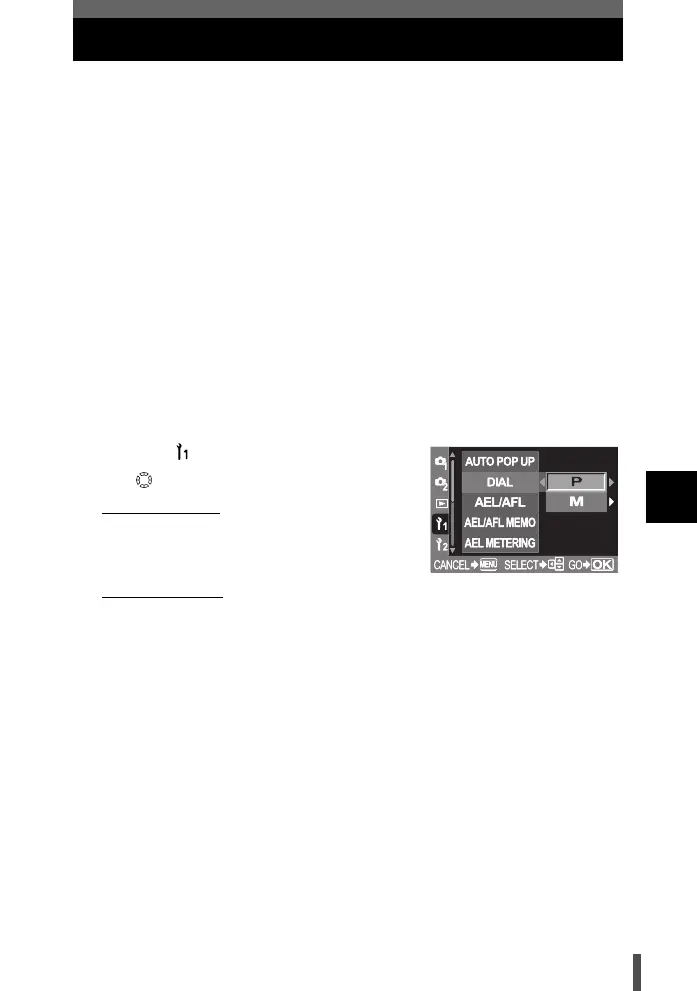
Customizing the control dial’s function
The control dial factory default settings are as follows:
P Program shooting
M Manual shooting
Setting [DIAL] enables the following:
P You can set exposure compensation simply by rotating the control
dial.
M You can set aperture value simply by rotating the control dial.
1 Menu [] [DIAL]
2 Use to select [P] or [M].
If you select [P]
1) Use ac to set.
[Ps] Program shift
[F] Exposure compensation
If you select [M]
1) Use ac to set.
[Fno.] Aperture setting
[SHUTTER] Shutter speed setting
3 Press the i button.
Rotating the control dial : Program shift (Ps) setting
Rotating the control dial while
holding down the F (exposure
compensation) button : Exposure compensation setting
Rotating the control dial : Shutter speed setting
Rotating the control dial while
holding down the F (exposure
compensation) button : Aperture value (f-number) setting
s0004_e_Advanced.book Page 127 Tuesday, September 27, 2005 4:15 PM













 To Next Page