93
6
Exposure, image and color
Picture mode
You can select image tone to create unique image effects. You can also fine-
adjust image parameters such as contrast and sharpness for each mode.
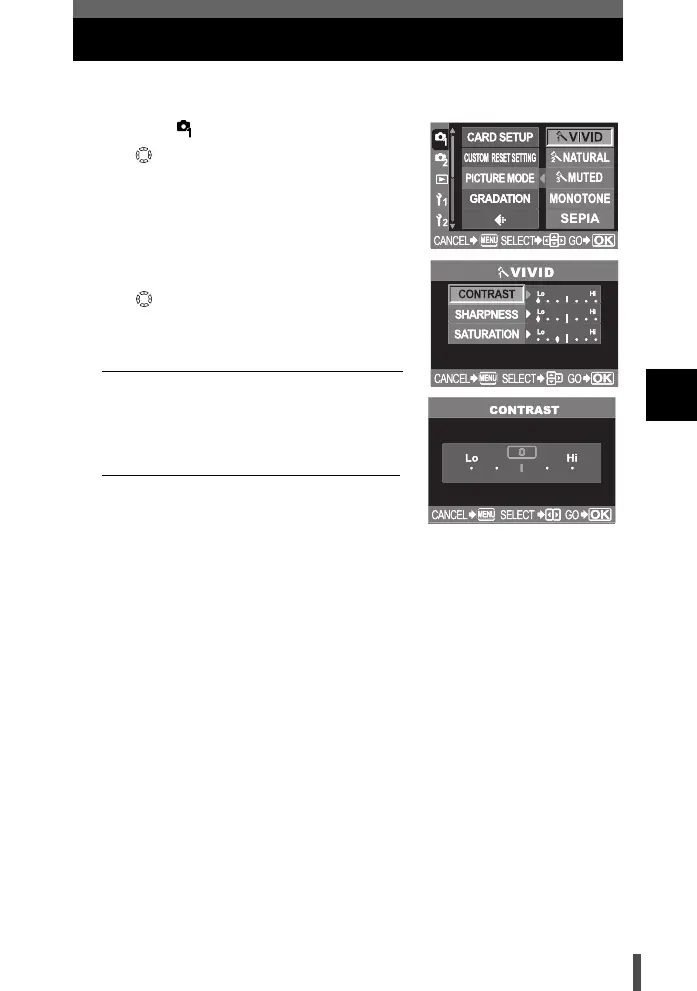
1 Menu [] [PICTURE MODE]
2 Use to select the picture effect mode.
[VIVID] Produces vivid colors.
[NATURAL] Produces natural colors.
[MUTED] Produces flat tone.
[MONOTONE] Produces black and white
tone.
[SEPIA] Produces sepia tone.
3 Use to adjust the item below.
Available adjustment parameters vary
depending on the selected mode.
When selecting [VIVID] / [NATURAL] / [MUTED]
[CONTRAST] Distinction between light and
dark.
[
SHARPNESS
] Sharpness of the image.
[SATURATION]
Color depth of images.
When selecting [SEPIA] / [MONOTONE]
[CONTRAST] Distinction between light and
dark.
[
SHARPNESS
] Sharpness of the image.
[B&W FILTER]
Creates a black and white
image. The filter color is brightened and the complementary
color is darkened.
[N: NEUTRAL]
Creates a normal black and white image.
[Ye: YELLOW]
Reproduces clearly defined white cloud with natural blue sky.
[Or: ORANGE]
Slightly emphasizes colors in blue skies and sunsets.
[R: RED]
Strongly emphasizes colors in blue skies and brightness
of crimson foliage.
[G: GREEN]
Strongly emphasizes colors in red lips and green leaves.
[PICT. TONE] Colors the black and white image.
[N: NEUTRAL]
Creates a normal black and white image.
[S: SEPIA]
Sepia
[B: BLUE]
Blue
[P: PURPLE]
Purple
[G: GREEN]
Green
4 Press the i button.
• Your adjustment is saved.
s0004_e_Advanced.book Page 93 Tuesday, September 27, 2005 4:15 PM













 To Next Page