108
Playback
7
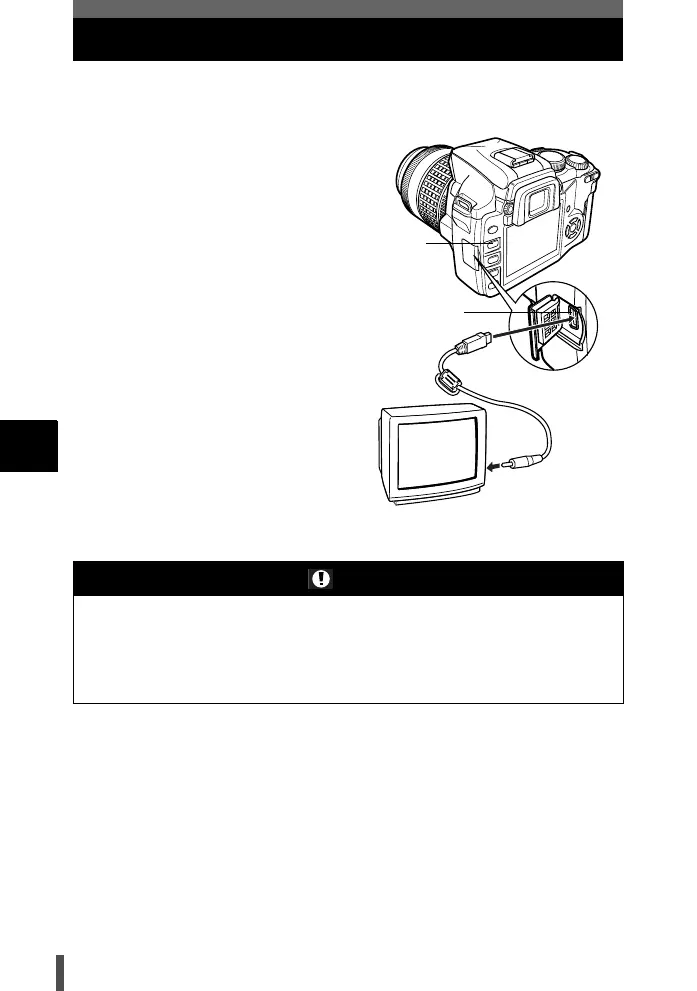
Playback on TV
Use the video cable provided with the camera to play back recorded images
on your TV.
1 Turn the camera and TV off,
and connect the video cable as
illustrated.
2 Turn on the TV and set it to the
video input mode. For details
on switching to the video input
mode, refer to the TV’s
instruction manual.
3 Turn the camera on and press
the q (playback) button.
Notes
• To connect the camera to a TV, use the provided video cable.
• Make sure that the camera’s video output signal type is the same as the TV’s video
signal type. g "Selecting the video signal type before TV connection" (P. 135)
• The camera’s monitor turns off automatically when the video cable is connected to
the camera.
• The image may appear off-center depending on the TV screen.
q button
Multi-connector
Video input terminal
Video cable
s0004_e_Advanced.book Page 108 Tuesday, September 27, 2005 4:15 PM













 To Next Page