114
Playback
7
Protecting images — Preventing accidental erasure
Protect images you do not want to erase. Protected images cannot be erased
by the selected frame/all-frame erase function.
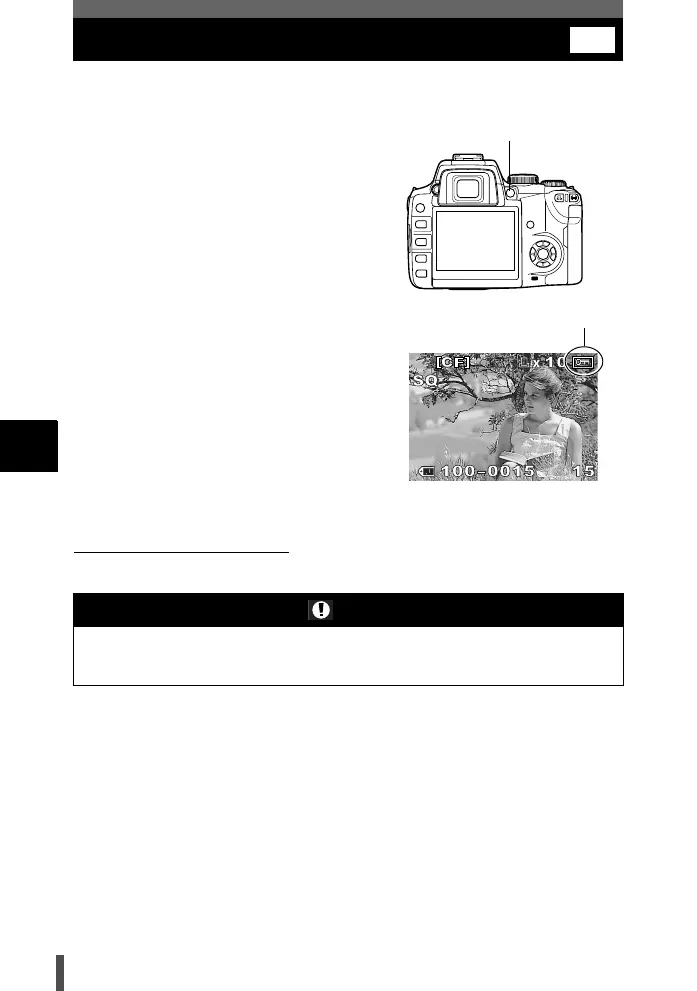
1 Play back the image you want to
protect. g P. 9 8
2 Press the AEL/AFL/0 (protect)
button.
• 9 is displayed on the screen.
To cancel the protection
Display the images that are protected and press the AEL/AFL/0 button.
Notes
• Formatting the card erases all images even if they have been protected.
g P. 26
• Protected images cannot be rotated.
0
Protect mark
AEL/AFL/0 button
s0004_e_Advanced.book Page 114 Tuesday, September 27, 2005 4:15 PM














 To Next Page