107
Sequence Input Instructions Section 3-2
3-2-11 TR Bits
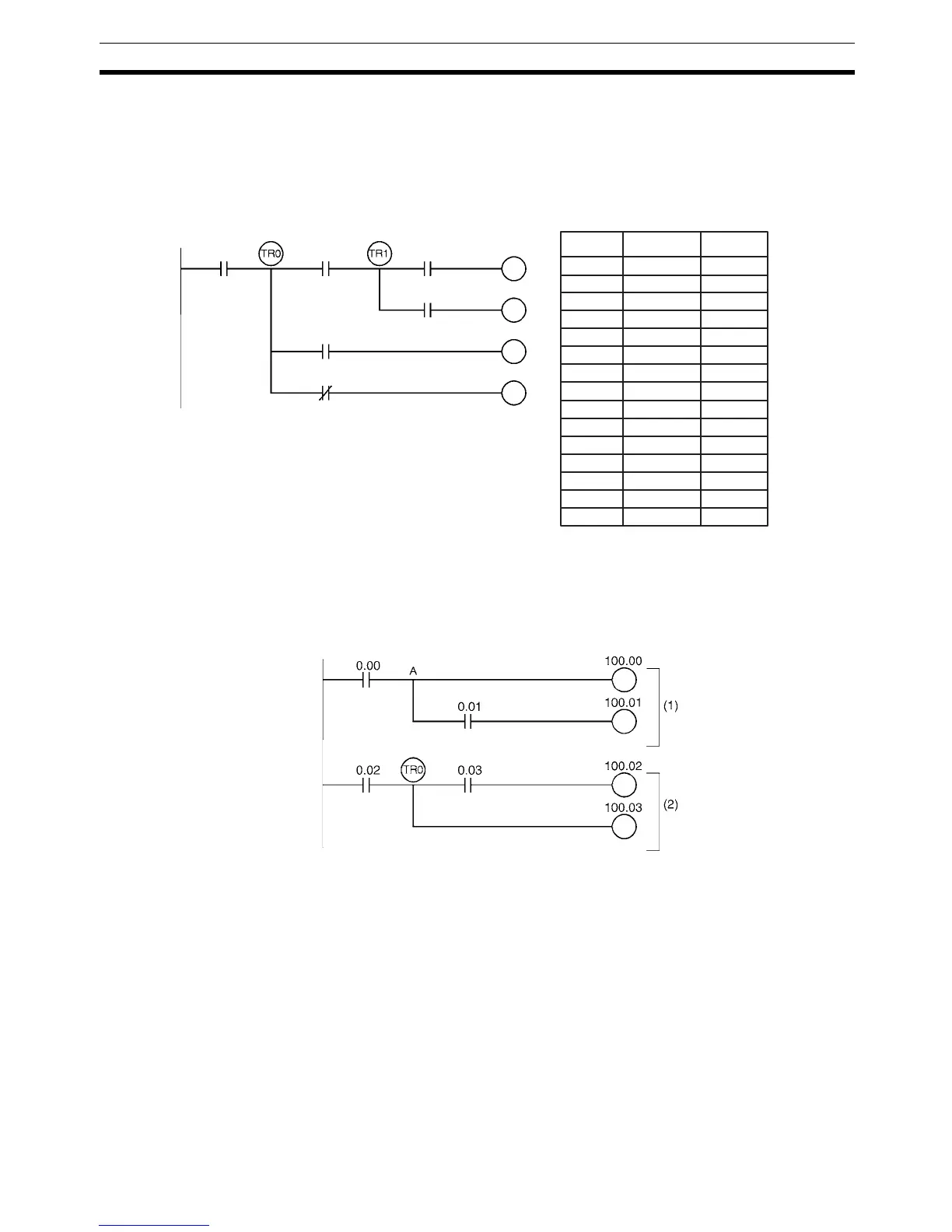
TR bits are used to temporarily retain the ON/OFF status of execution condi-
tions in a program when programming in mnemonic code. They are not used
when programming directly in ladder program form because the processing is
automatically executed by the CX-Programmer. The following diagram shows
a simple application using two TR bits.
Using TR0 to TR15 TR0 to TR15 are used only with LOAD and OUTPUT instructions. There are
no restrictions on the order in which the bit addresses are used.
Sometimes it is possible to simplify a program by rewriting it so that TR bits
are not required. The following diagram shows one case in which a TR bit is
unnecessary and one in which a TR bit is required.
In instruction block (1), the ON/OFF status at point A is the same as for output
CIO 100.00, so AND 0.01 and OUT 100.01 can be coded without requiring a
TR bit. In instruction block (2), the status of the branching point and that of
output CIO 100.02 are not necessarily the same, so a TR bit must be used. In
this case, the number of steps in the program could be reduced by using
instruction block (1) in place of instruction block (2).
TR0 to TR15
Considerations
TR bits are used only for retaining (OUT TR0 to TR15) and restoring (LD TR0
to TR15) the ON/OFF status of branching points in programs with many out-
put branches. They are thus different from general bits, and cannot be used
with AND or OR instructions, or with instructions that include NOT.
00200 LD 0.00
00201 OUT TR0
00202 AND 0.01
00203 OUT TR1
00204 AND 0.02
00205 OUT 100.00
00206 LD TR1
00207 AND 0.03
00208 OUT 100.01
00209 LD TR0
00210 AND 0.04
00211 OUT 100.02
00212 LD TR0
00213 AND NOT 0.05
00214 OUT 100.03
100.00
100.01
100.02
100.03
0.02
0.03
0.010.00
0.04
0.05
Instruction OperandsAddress



 To Next Page