195
Timer and Counter Instructions Section 3-5
When a CNT/CNTX(546) counter is forced set, its Completion Flag will be
turned ON and its PV will be reset to 0000. When a CNT/CNTX(546) counter
is forced reset, its Completion Flag will be turned OFF and its PV will be set to
the SV.
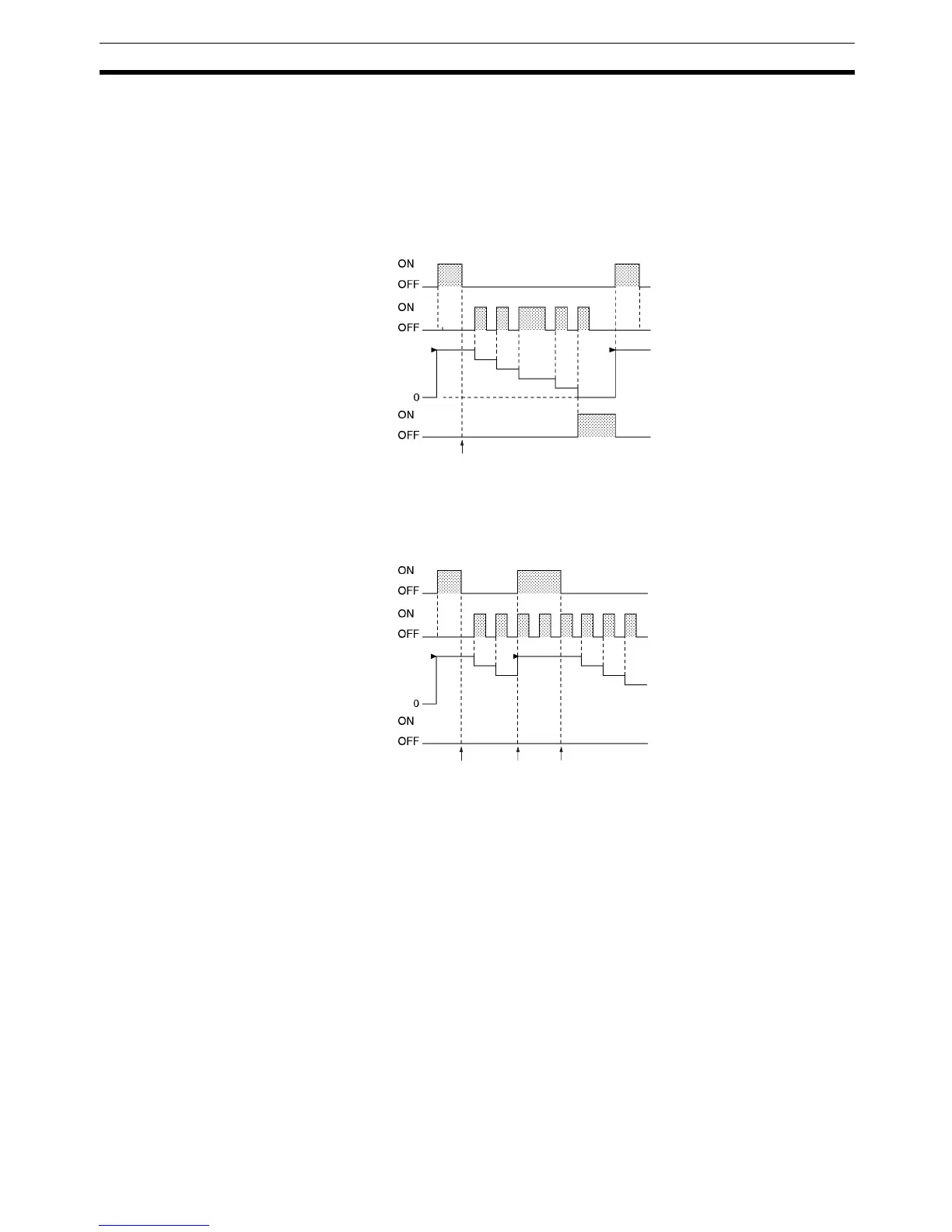
Be sure to reset the counter by turning the reset input from
OFF
→ ON → OFF before beginning counting with the count input, as shown
in the following diagram. The count input will not be received if the reset input
is ON.
The reset input will take precedence and the counter will be reset if the reset
input and count input are both ON at the same time. (The PV will be reset to
the SV and the Completion Flag will be turned OFF.)
The operation of the = Flag and N Flag depends on the model of the CPU
Unit. Refer to Flags, above, for details.
Note If online editing is used to add a counter, the counter must be reset before it
will work properly. If the counter is not reset, the previous value will be used as
the counter’s present value (PV), and the counter may not operate properly
after it is written.
SV
Reset input
Counter PV
Count input
Ready to start
counting
Completion
Flag
SV
Reset input
Counter PV
Count input
Completion
Flag
Count input
can be re-
ceived.
Reset input
takes pre-
cedence.
Count input
can be re-
ceived.



 To Next Page