219
Comparison Instructions Section 3-6
Flags
Precautions Time comparison instructions cannot be used as right-hand instructions, i.e.,
another instruction must be used between them and the right bus bar.
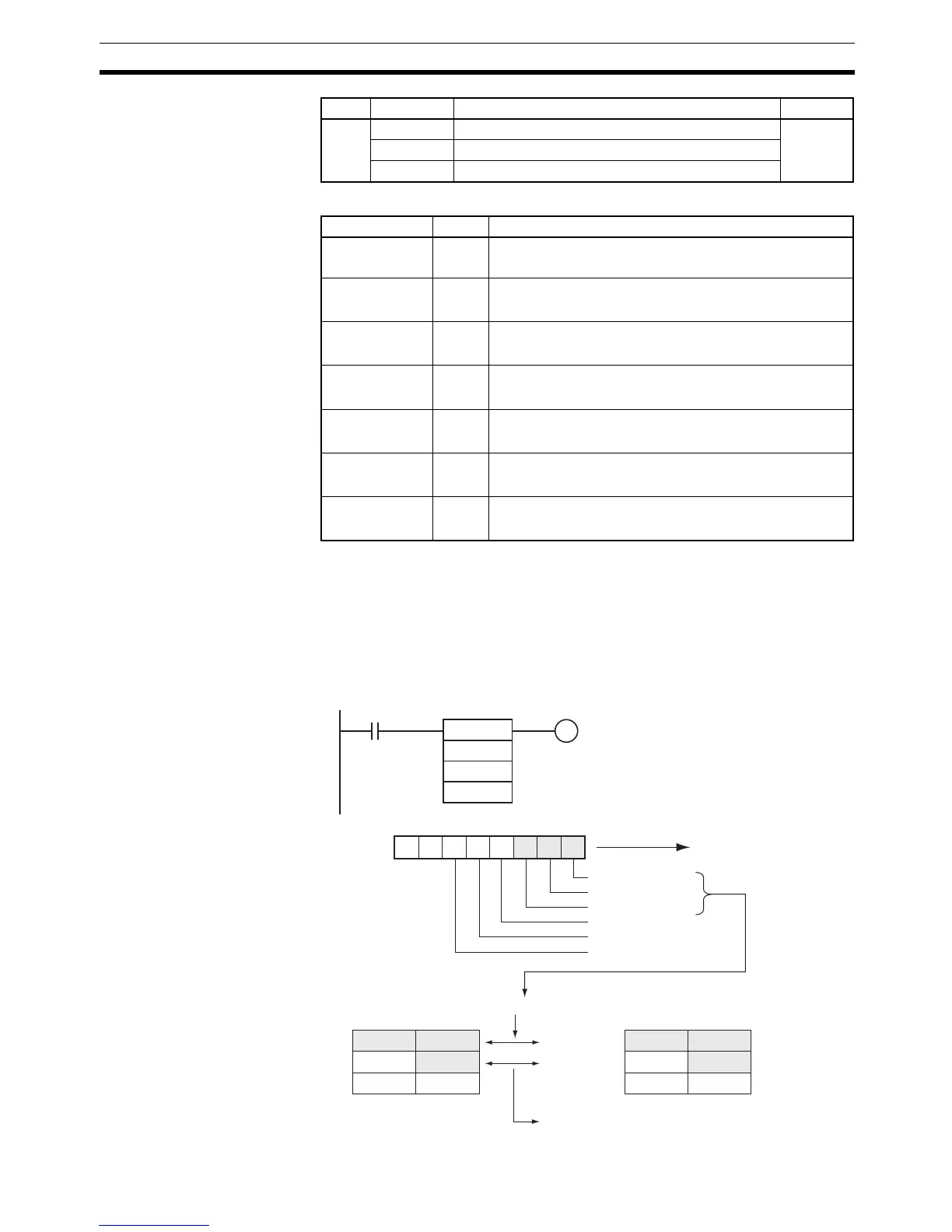
Example When CIO 0.00 is ON and the time is 13:00:00, CIO 100.00 is turned ON. The
contents of A351 to A353 (the CPU Unit’s internal calendar/clock data) are
used as the present time data and the contents of D100 to D102 are used as
the comparison time data. The year, month, and day values are masked, so
only the hour, minute, and second data are compared.
346 LD>=DT LOAD GREATER THAN OR EQUAL True if
S1 ≥ S2
AND>=DT AND GREATER THAN OR EQUAL
OR>=DT OR GREATER THAN OR EQUAL
Code Mnemonic Name Function
Name Label Operation
Error Flag ER ON if all 6 of the mask bits (C bits 00 to 05) are ON.
OFF in all other cases.
Greater Than
Flag
>ON if S
1
> S
2
.
OFF in all other cases.
Greater Than or
Equal Flag
>= ON if S
1
≥ S
2
.
OFF in all other cases.
Equal Flag = ON if S
1
= S
2
.
OFF in all other cases.
Not Equal Flag = ON if S
1
≠ S
2
.
OFF in all other cases.
Less Than Flag < ON if S
1
< S
2
.
OFF in all other cases.
Less Than or
Equal Flag
<= ON if S
1
≤ S
2
.
OFF in all other cases.
01234567
- 111000-
D0
0.00
C
S
1
S2
100.00
=DT
D0
A351
D100
A351
A352
A353
07815
S2: D100
S
2+1: D101
S
2+2: D102
00 00
13
07815
-
--
D0 set to 0038 hex
Shaded data is compared.
Minute Second
Day of month Hour
Year Month
Conditions Flags set as soon as
execution condition is turned ON.
Seconds compared.
Minutes compared.
Hours compared.
Day masked.
Month masked.
Year masked.



 To Next Page