295
Data Shift Instructions Section 3-8
Precautions When RORL(573) is executed, the Error Flag will turn OFF.
If as a result of the shift the contents of Wd and Wd +1 are zero, the Equals
Flag will turn ON.
If as a result of the shift the contents of the leftmost bit of Wd + 1 is 1, the Neg-
ative Flag will turn ON.
Note It is possible to set the Carry Flag contents to 1 or 0 immediately before exe-
cuting this instruction, by using the Set Carry (STC(040)) or Clear Carry
(CLC(041)) instructions.
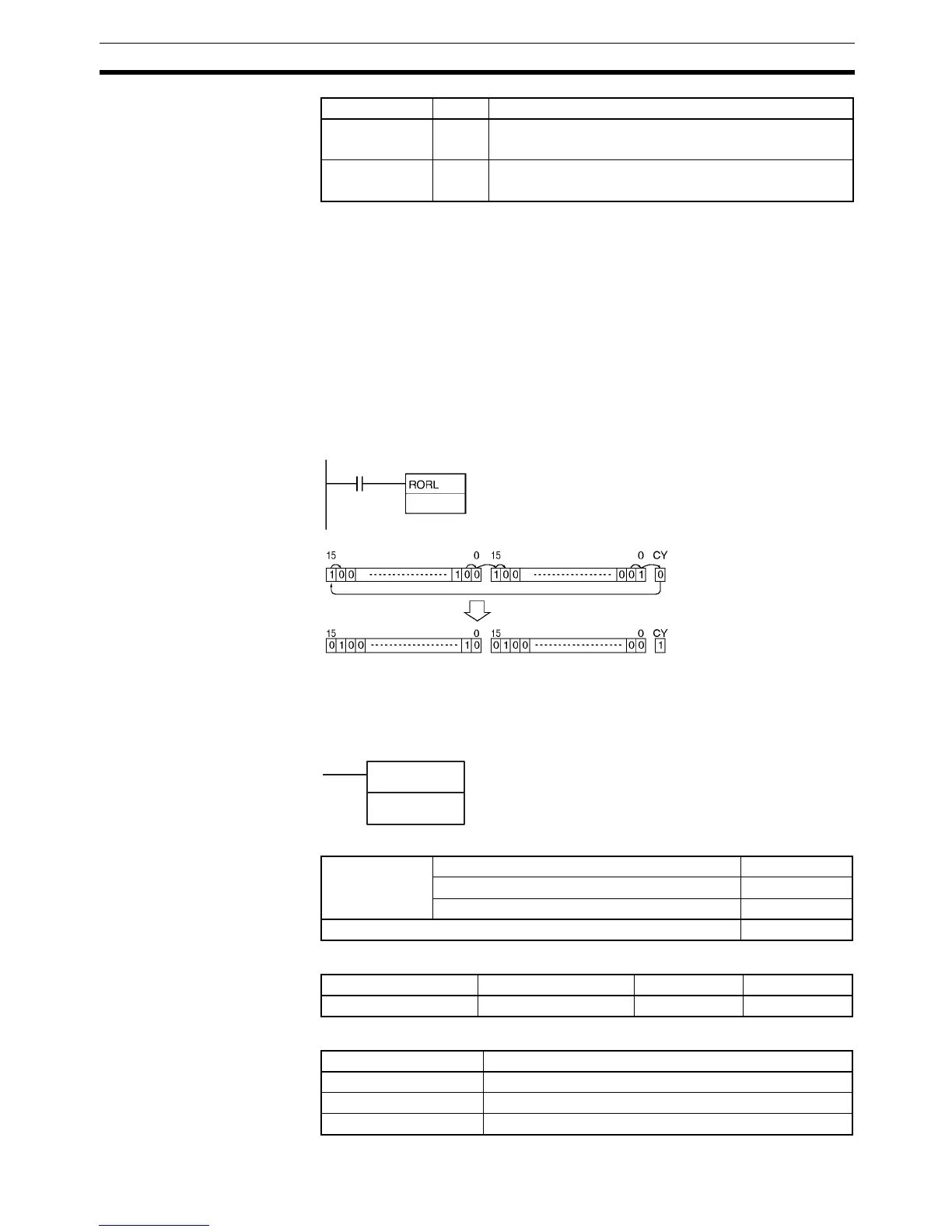
Examples When CIO 0.01 is ON, word CIO 2000, CIO 2001 and the Carry Flag (CY) will
shift one bit to the right. The contents of CIO 2000.00 will be shifted to the
Carry Flag (CY) and the Carry Flag contents will be shifted to CIO 2001.15.
3-8-13 ROTATE LEFT WITHOUT CARRY: RLNC(574)
Purpose Shifts all Wd bits one bit to the left not including the Carry Flag (CY).
Ladder Symbol
Variations
Applicable Program Areas
Operand Specifications
Carry Flag CY ON when 1 is shifted into the Carry Flag (CY).
OFF in all other cases.
Negative Flag N ON when the leftmost bit is 1 as a result of the shift.
OFF in all other cases.
Name Label Operation
0.01
2000
Wd
Instruction executed once
Wd: CIO 2000Wd+1: CIO 2001
RLNC(574)
Wd: Word
Wd
Variations Executed Each Cycle for ON Condition RLNC(574)
Executed Once for Upward Differentiation @RLNC(574)
Executed Once for Downward Differentiation Not supported
Immediate Refreshing Specification Not supported
Block program areas Step program areas Subroutines Interrupt tasks
OK OK OK OK
Area Wd
CIO Area CIO 0 to CIO 6143
Work Area W0 to W511
Holding Bit Area H0 to H511



 To Next Page