421
Conversion Instructions Section 3-11
C = 0002 (Input Data Range: –999 to 9999 BCD)
C = 0003 (Input Data Range: –1999 to 9999 BCD)
The following table shows the possible BCD values for each signed BCD for-
mat and the corresponding signed binary values.
Flags
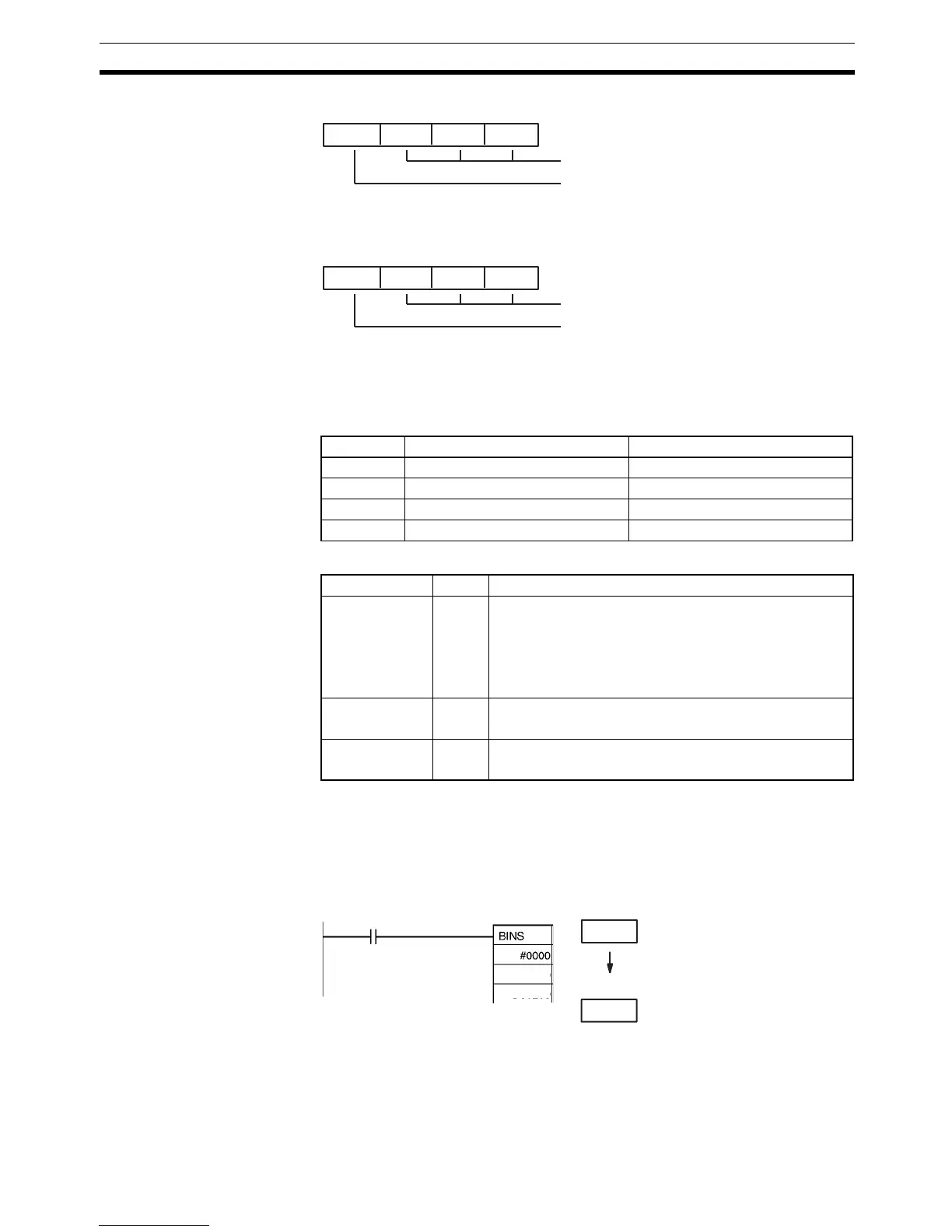
Examples BCD Format 0 (C=#0000)
When CIO 0.00 is ON in the following example, the signed BCD data format
and range in D100 are checked against the format specified in the control
word (0000). The source data is correct, so the signed BCD data in D100 is
converted to signed binary and output to D200.
Setting Signed BCD values Signed binary values
C=0000 –999 to –1 and 0 to 999 FC19 to FFFF and 0000 to 03E7
C=0001 –7999 to –1 and 0 to 7999 E0C1 to FFFF and 0000 to 1F3F
C=0002 –999 to –1 and 0 to 9999 FC19 to FFFF and 0000 to 270F
C=0003 –1999 to –1 and 0 to 9999 F831 to FFFF and 0000 to 270F
3 digits BCD, 12 bits
0 to 9: Fourth digit BCD
F: Negative (−)
A to E: Error
3 digits BCD, 12 bits
0 to 9: Fourth digit BCD
A: Negative (−1)
F: Negative (−)
B to E: Error
Name Label Operation
Error Flag ER ON if C is not within the specified range of 0000 to 0003.
ON if C=0002 and the leftmost digit of S is A to E.
ON if C=0003 and the leftmost digit of S is B to E.
ON if the content of S is not BCD.
OFF in all other cases.
Equals Flag = ON if D is 0000 after execution.
OFF in all other cases.
Negative Flag N ON if bit 15 of D is ON after execution.
OFF in all other cases.
S: D100
1 1 2 3
D: D200
F F 8 5
0.00
D100
D200
Signed binary data
Signed BCD data (–123)



 To Next Page