545
Double-precision Floating-point Instructions Section 3-15
If the absolute value of the result is greater than the maximum value that can
be expressed as floating-point data, the Overflow Flag will turn ON and the
result will be output as
±∞.
If the absolute value of the result is less than the minimum value that can be
expressed as floating-point data, the Underflow Flag will turn ON and the
result will be output as 0.
Flags
Precautions The source data in words S to S+3 must be in IEEE754 floating-point data for-
mat.
3-15-10 DOUBLE RADIANS TO DEGREES: DEGD(850)
Purpose Converts a double-precision (64-bit) floating-point number from radians to
degrees and places the result in the specified result words.
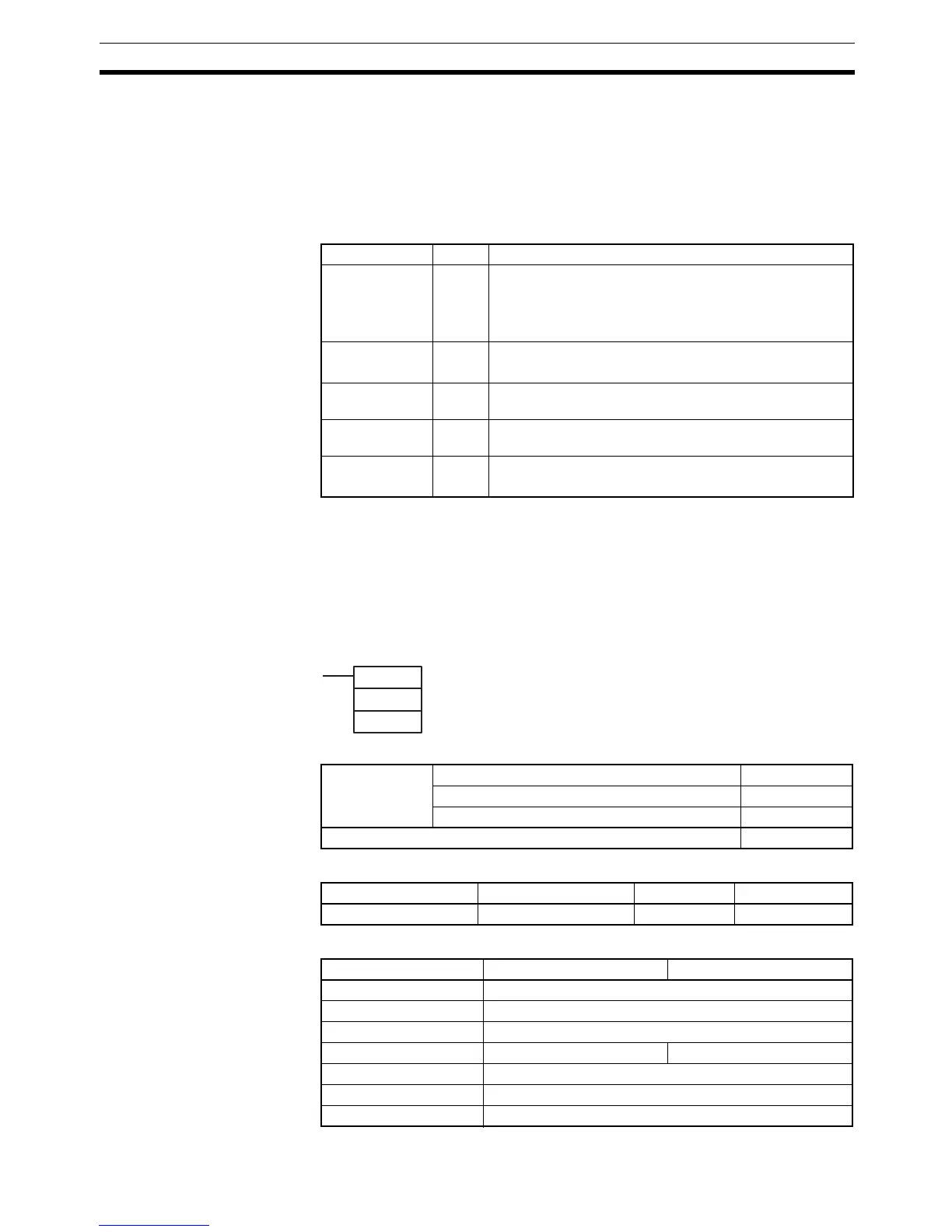
Ladder Symbol
Variations
Applicable Program Areas
Operand Specifications
Name Label Operation
Error Flag ER ON if the source data is not recognized as floating-point
data.
ON if the source data is not a number (NaN).
OFF in all other cases.
Equals Flag = ON if both the exponent and mantissa of the result are 0.
OFF in all other cases.
Overflow Flag OF ON if the absolute value of the result is too large to be
expressed as a double-precision floating-point value.
Underflow Flag UF ON if the absolute value of the result is too small to be
expressed as a double-precision floating-point value.
Negative Flag N ON if the result is negative.
OFF in all other cases.
DEGD(850)
S
D
S: First source word
D: First destination word
Variations Executed Each Cycle for ON Condition DEGD(850)
Executed Once for Upward Differentiation @DEGD(850)
Executed Once for Downward Differentiation Not supported.
Immediate Refreshing Specification Not supported.
Block program areas Step program areas Subroutines Interrupt tasks
OK OK OK OK
Area S D
CIO Area CIO 0 to CIO 6140
Work Area W0 to W508
Holding Bit Area H0 to H508
Auxiliary Bit Area A0 to A956 A448 to A956
Timer Area T0000 to T4092
Counter Area C0000 to C4092
DM Area D0 to D32764



 To Next Page