934
Debugging Instructions Section 3-27
1,2,3... 1. Set the following parameters with the CX-Programmer.
a. Set the address of the bit or word to be traced.
b. Set the trigger condition. One of the three following conditions can con-
trol when data stored into Trace Memory is valid.
i) The Trace Start Bit goes from OFF to ON.
ii) A specified bit goes from OFF to ON.
iii) The value of a specified word matches the set value.
c. Set the sampling interval to “TRSM” for sampling at the execution of
TRSM(045) in the program.
d. Set the delay.
2. When the Sampling Start Bit is turned from OFF to ON with the CX-Pro-
grammer, the specified data will begin being sampled each time that
TRSM(045) is executed and the sampled data will be stored in Trace Mem-
ory. The Trace Busy Flag (A508.13) will be turned ON at the same time.
3. When the trigger condition (Trace Start Bit ON, specified bit ON, or value
of specified word matching set value) is met, the sampled data will be valid
beginning with the next sample plus or minus the number of samples set
with the delay setting. The Trace Trigger Monitor Flag (A508.11) will be
turned ON at the same time.
4. The trace will end when TRSM(045) has been executed enough times to
fill the Trace Memory. When the trace ends, the Trace Completed Flag
(A508.12) will be turned ON and the Trace Busy Flag (A508.13) will be
turned OFF.
5. Read the contents of Trace Memory with the CX-Programmer.
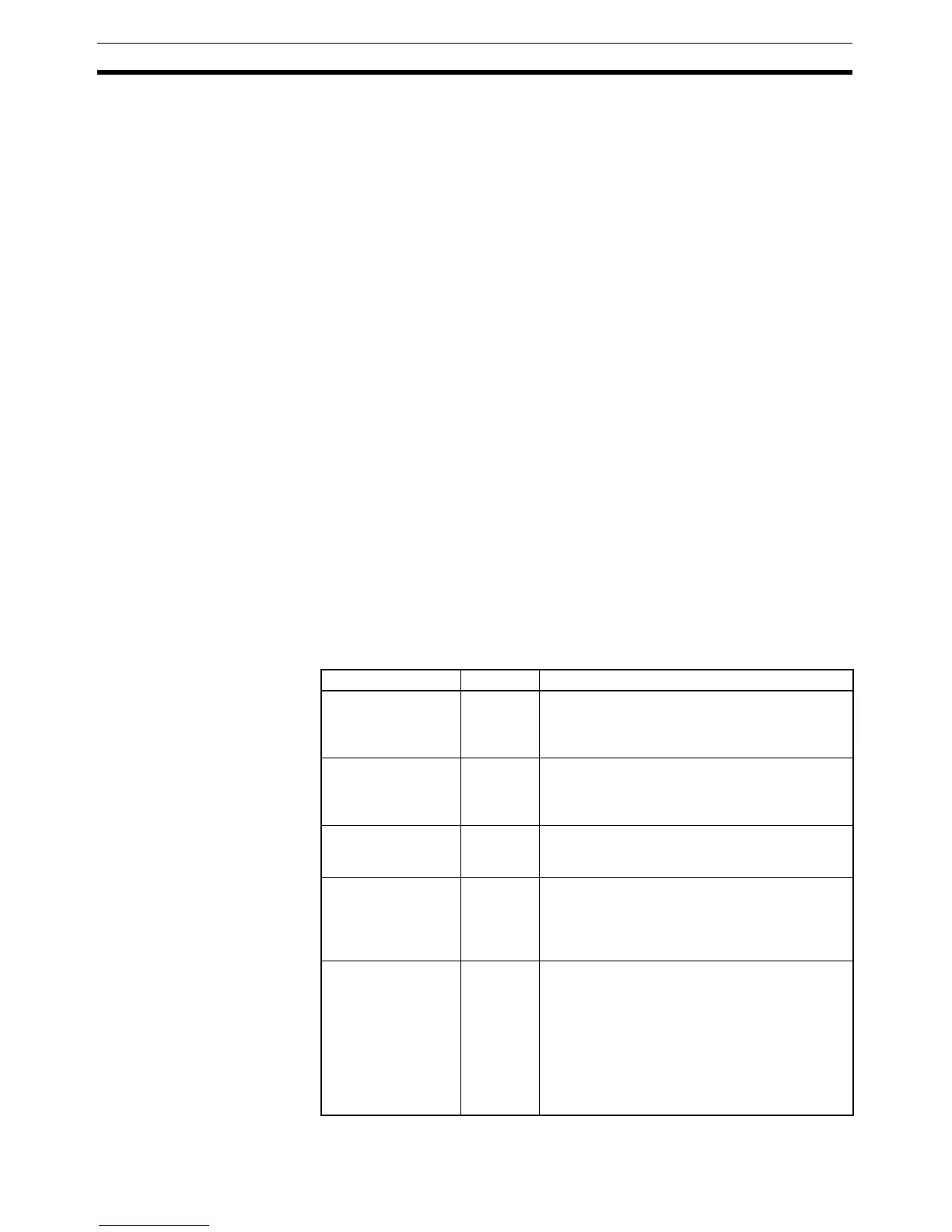
The following table shows relevant bits and flags in the Auxiliary Area. Only
A508.14 and A508.15 are meant to be controlled by the user, and A508.15
must not be turned ON from the program, i.e., it must be turned ON only from
the CX-Programmer.
Name Address Operation
Trace Trigger Monitor
Flag
A508.11 This flag is turned ON when the trigger condition
has been established with the Trace Start Bit. It is
turned OFF when sampling is started for the next
trace (by the Sampling Start Bit).
Trace Completed
Flag
A508.12 This flag is turned ON when trace samples have
filled the Trace Memory. It is turned OFF the next
time that the Sampling Start Bit goes from OFF to
ON.
Trace Busy Flag A508.13 This flag is turned ON when the Sampling Start
Bit goes from OFF to ON. It is turned OFF when
the trace is completed.
Trace Start Bit A508.14 The trace trigger conditions are established when
this bit is turned from OFF to ON. Samples will be
recorded after the specified delay (positive delay)
or the specified number of existing samples will
be valid (negative delay).
Sampling Start Bit A508.15 When this bit is turned from OFF to ON from the
CX-Programmer, data samples will start being
stored in Trace Memory with one of the following
three methods used to determine sampling:
1) Periodic sampling (10 to 2,550 ms intervals)
2) Sampling at TRSM(045) execution
3) Sampling at the end of each cycle
This bit must be turned ON and OFF from the
CX-Programmer.



 To Next Page