939
Failure Diagnosis Instructions Section 3-28
Generating Non-fatal System Errors
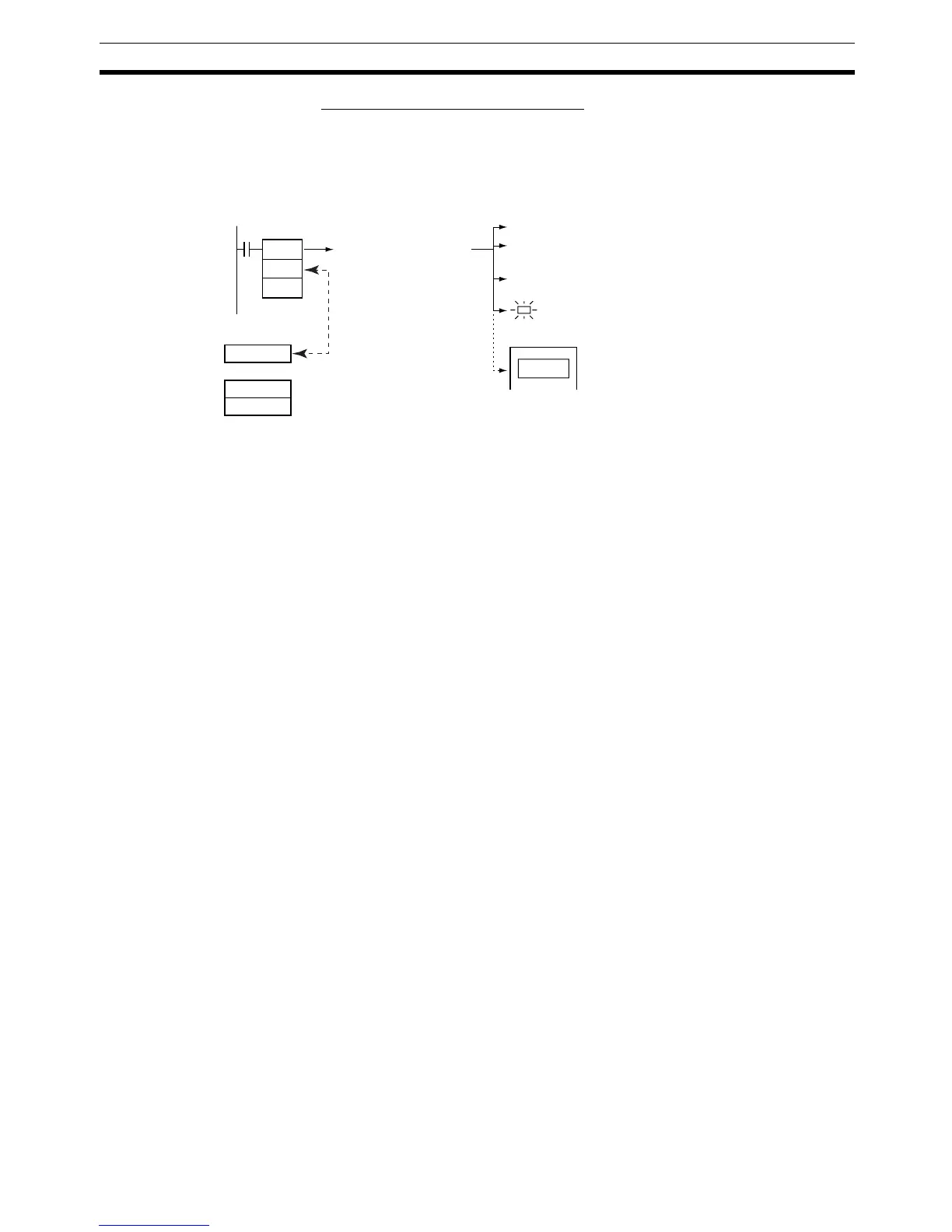
When FAL(006) is executed with N set to an FAL number (&1 to &511) that is
equal to the content of A529 (the system-generated FAL/FALS number), a
non-fatal error will be generated with the error code and error details code
specified in S and S+1. The following processing will be performed at the
same time:
1,2,3... 1. The specified error code will be written to A400.
2. The error code and the time that the error occurred will be written to the
Error Log Area (A100 through A199).
3. The appropriate Auxiliary Area Flags are set based on the error code and
error details.
4. The ERR Indicator on the CPU Unit will flash and PLC operation will con-
tinue.
5. The non-fatal error message for the specified system error will be dis-
played on the CX-Programmer.
Note (1) FAL(006) can be used to generate non-fatal errors from the system when
debugging the program. For example, a system error can be generated
intentionally to check whether or not error messages are being displayed
properly at an interface such as a Programmable Terminal (PT).
(2) The value of A529 (the system-generated FAL/FALS number) is a dummy
FAL number (FAL, FALS, and FPD numbers are shared.) used when a
non-fatal error is generated intentionally by the system. This number is a
dummy FAL number, so it does not change the status of the Executed
FAL Number Flags (A360.01 to A391.15) or the error code.
When it is necessary to generate two or more system errors (fatal and/or
non-fatal errors), different errors can be generated by executing the FAL/
FALS/FPD instructions more than once with the same values in A529 and
N, but different values in S and S+1.
(3) If a more serious error (including a system-generated fatal error or
FALS(007) error) occurs at the same time as the FAL(006) instruction, the
more serious error’s error code will be written to A400.
(4) To clear a system error generated by FAL(006), turn the PLC OFF and
then ON again. The PLC can be kept ON, but the same processing will
be required to clear the error as if the specified error had actually oc-
curred.
FAL
N
S
NA529
S
S+1
Execution of FAL(006)
generates a non-fatal
system error with the
error code/details
specified in S and
S+1.
Error code
Error details
Error code written to A400
Error code and time written to Error Log Area
The corresponding Auxiliary Area Flags are set
based on the error code and error details.
ERR Indicator flashes.
Message displayed on
Programming Device.
Matching
values



 To Next Page