Section 2 NS Series Functions 2-11 Multifunction Objects
2-237
NS Series Programming Manual
Flicker (Extension Tab)
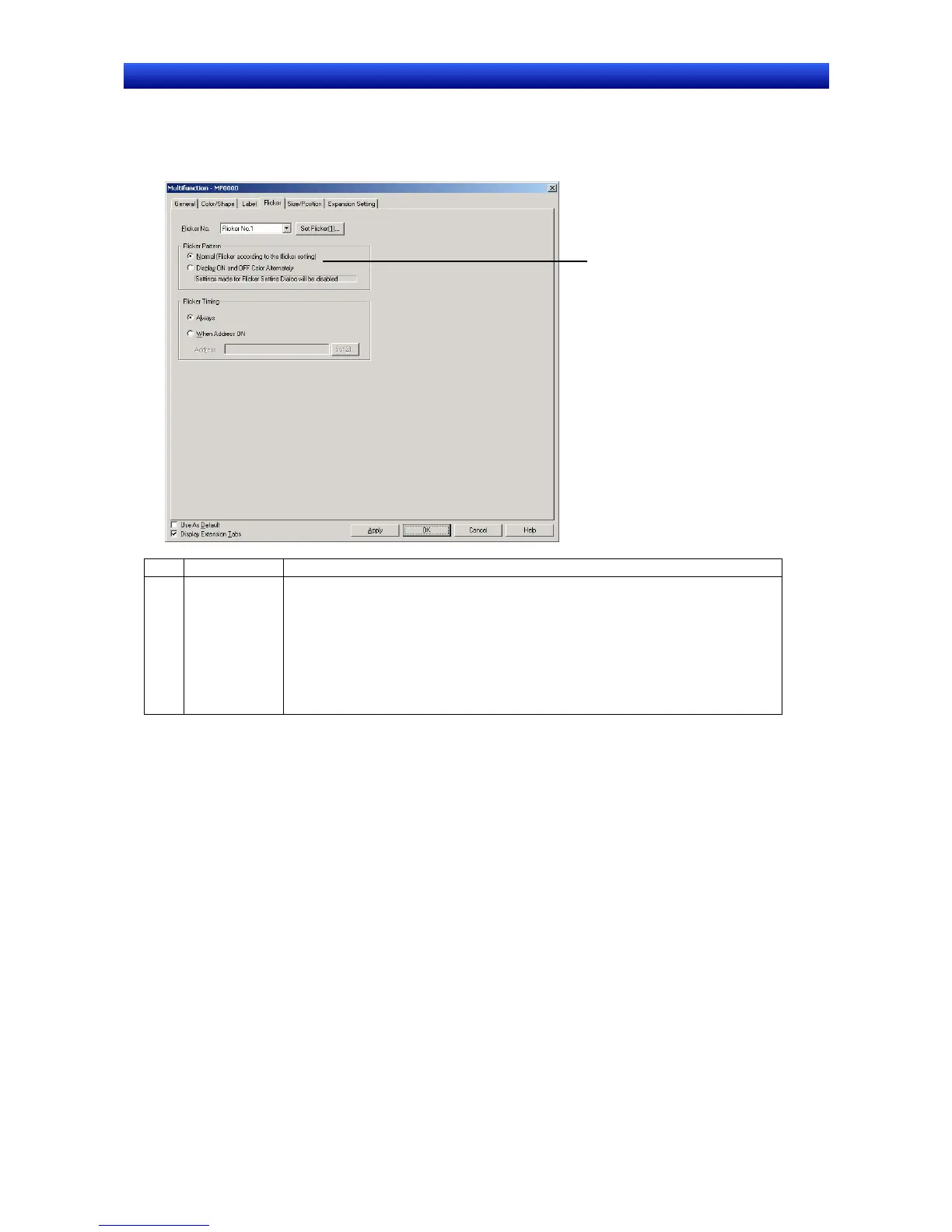
Make settings on the Flicker Tab Page to make functional objects flicker (flash). Refer to Flicker in 2-8
Common Functional Object Functions for information on basic settings. This section describes the set-
tings for Multifunction Objects only.
1
No. Item Details
1 Flicker Pattern
Used to set either flicker according to the flicker colors selected under
PT – Flicker
– Flicker settings
or flicker using the ON/OFF colors set on the Color/Shape Tab
Page.
The
Display ON and OFF Color Alternately Option can be selected only when the
following options are set under
Flicker Pattern on the Color/Shape Tab Page.
Color when pressed
Bit address
Bit Address/Color when pressed
Size/Position (Extension Tab)
Displays and sets the size and position of functional objects. Refer to Size/Position in 2-8 Common
Functional Object Functions for details.


 To Next Page
 Loading...





