Section 2 NS Series Functions 2-16 Broken-line Graphs
2-376
NS Series Programming Manual
Displaying the Graph of a Broken-line Graph Group
1
2
3
4
5
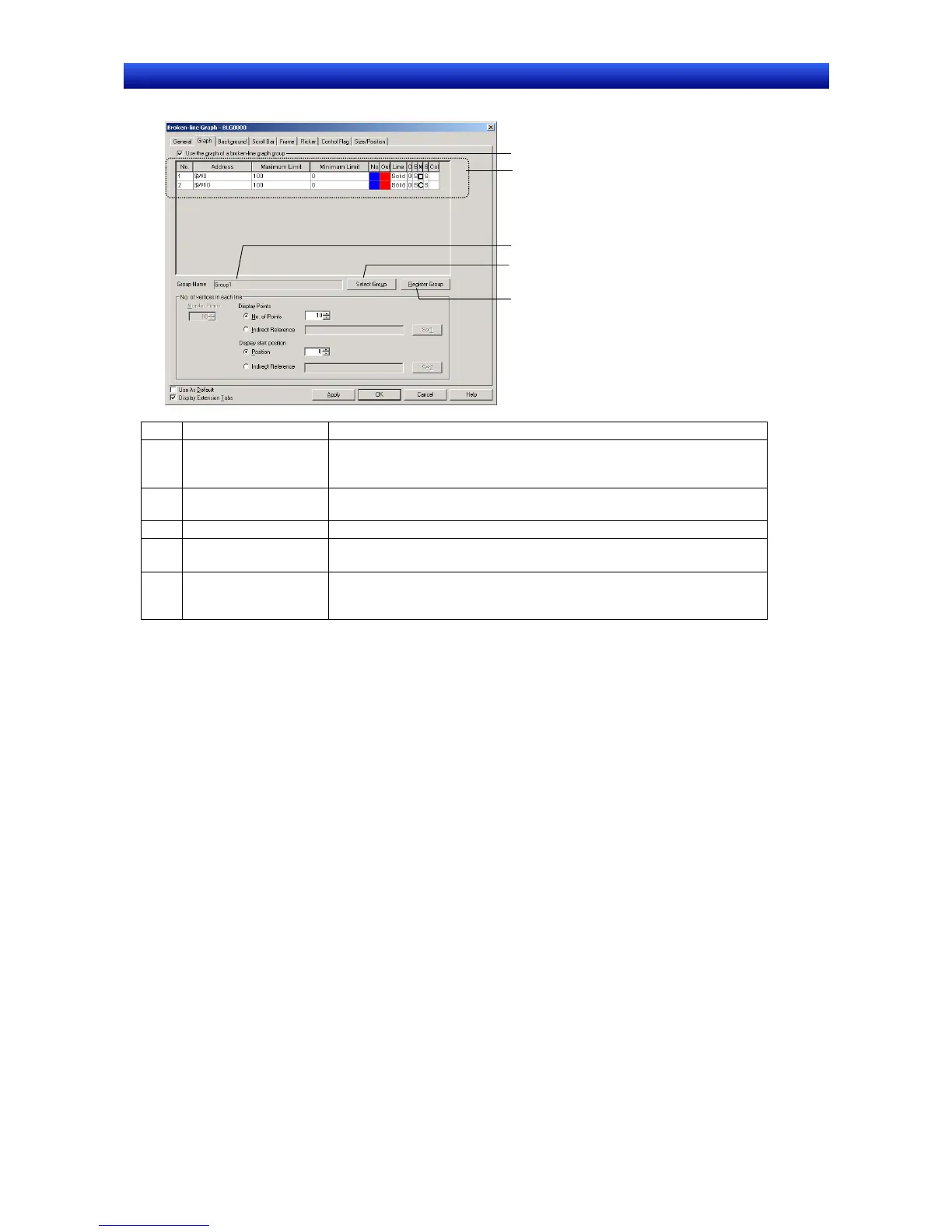
No. Setting Details
1 Use the graph of a
broken-line graph
group
Select this option to display the graph of a broken-line graph group.
2 Graph list Displays the information about graph lines registered in the displayed
broken-line graph group.
3 Group Name Displays the name of the displayed broken-line graph group.
4 Select Group Click the Select Group Button to display the Graph Group Selection
Window and select the group that will be displayed.
5 Register Group Click the Register Group Button to display the Broken-line Graph
Group List Window. Use this window to add a new broken-line graph
group, edit a group’s settings, or delete a group.


 To Next Page
 Loading...





