Operation
Version 1.0.4 - 2020-08-0430 Translation of original instruction
MT60
EN
MT60_GB_4.fm
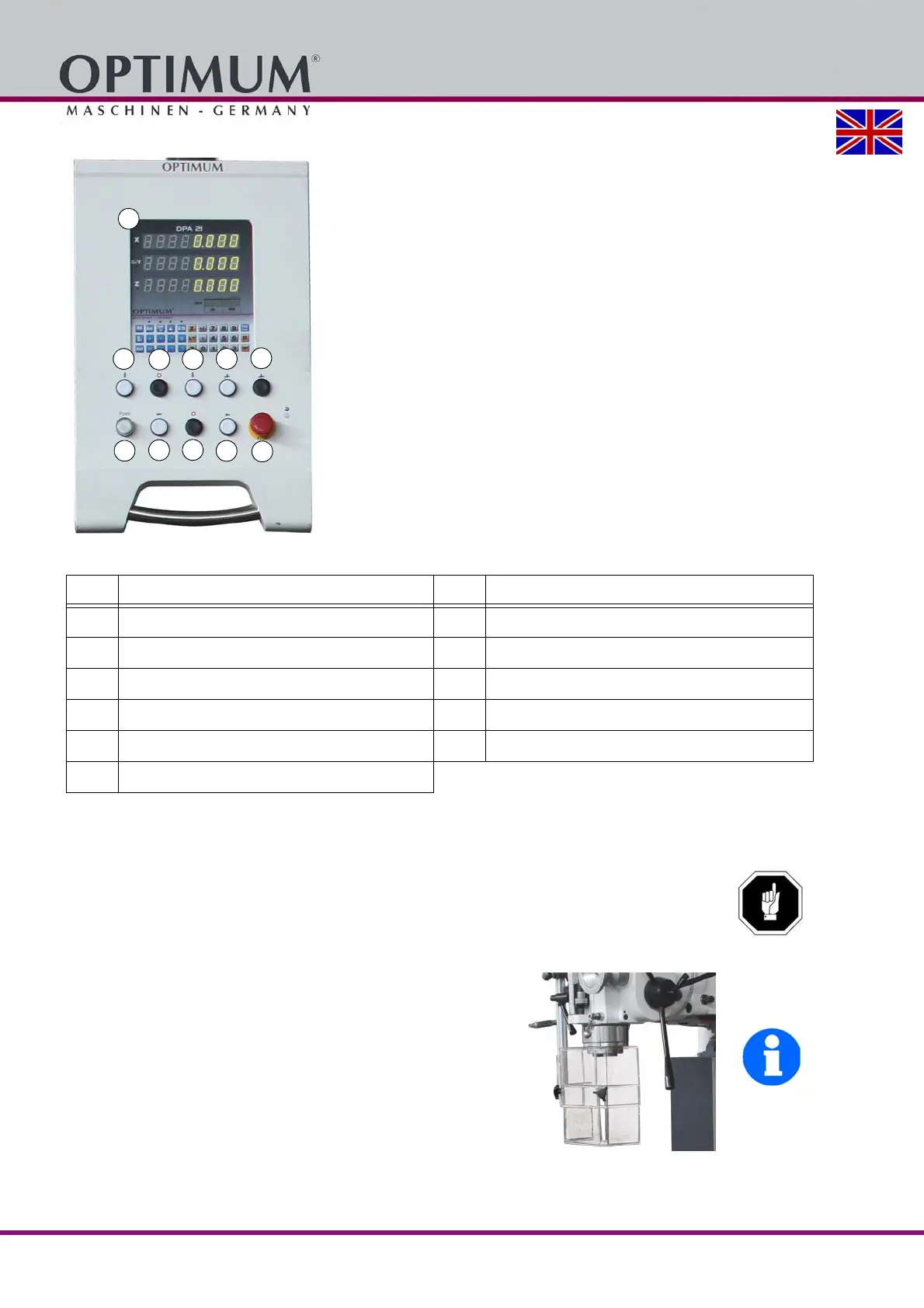
4.1.1 Control panel
Img.4-1: Control panel
4.2 Switching the milling machine on
ATTENTION!
Wait until the milling machine has come to a complete halt before changing the rotation
direction using the rotation direction switch.
Switch on the main switch.
If required, turn the emergency-stop push button to the right in order to release the push
button.
Set and close the spindle protection.
Switch the control on.
INFORMATION
The control turns on only when all actuators such as the
feed lever is in the neutral position.
Switch the control on.
Press the push button for vertical milling or horizontal
milling. Observe the direction of rotation.
Img.4-2: Spindle guard
The milling machine switches on and turns in the preselected rotation direction.
Pos. Designation Item Designation
1
Digital position indicator
7
Control "On"
2
Vertical spindle "Left-handed rotation"
8
Horizontal spindle "Left-handed rotation"
3
Vertical spindle "Rotation off"
9
Horizontal spindle "Rotation off"
4
Vertical spindle "Right-handed rotation"
10
Horizontal spindle "Right-handed rotation"
5
Coolant "On"
11
Emergency stop button
6
Coolant "Off"















 To Next Page