Operation
Version 1.0.4 - 2020-08-0444 Translation of original instruction
DPA21
EN
DPA21_GB_3.fm
5.3 Reference marker function
Set a zero point with preset axis values Set a relative coordinate system based on current
machine position
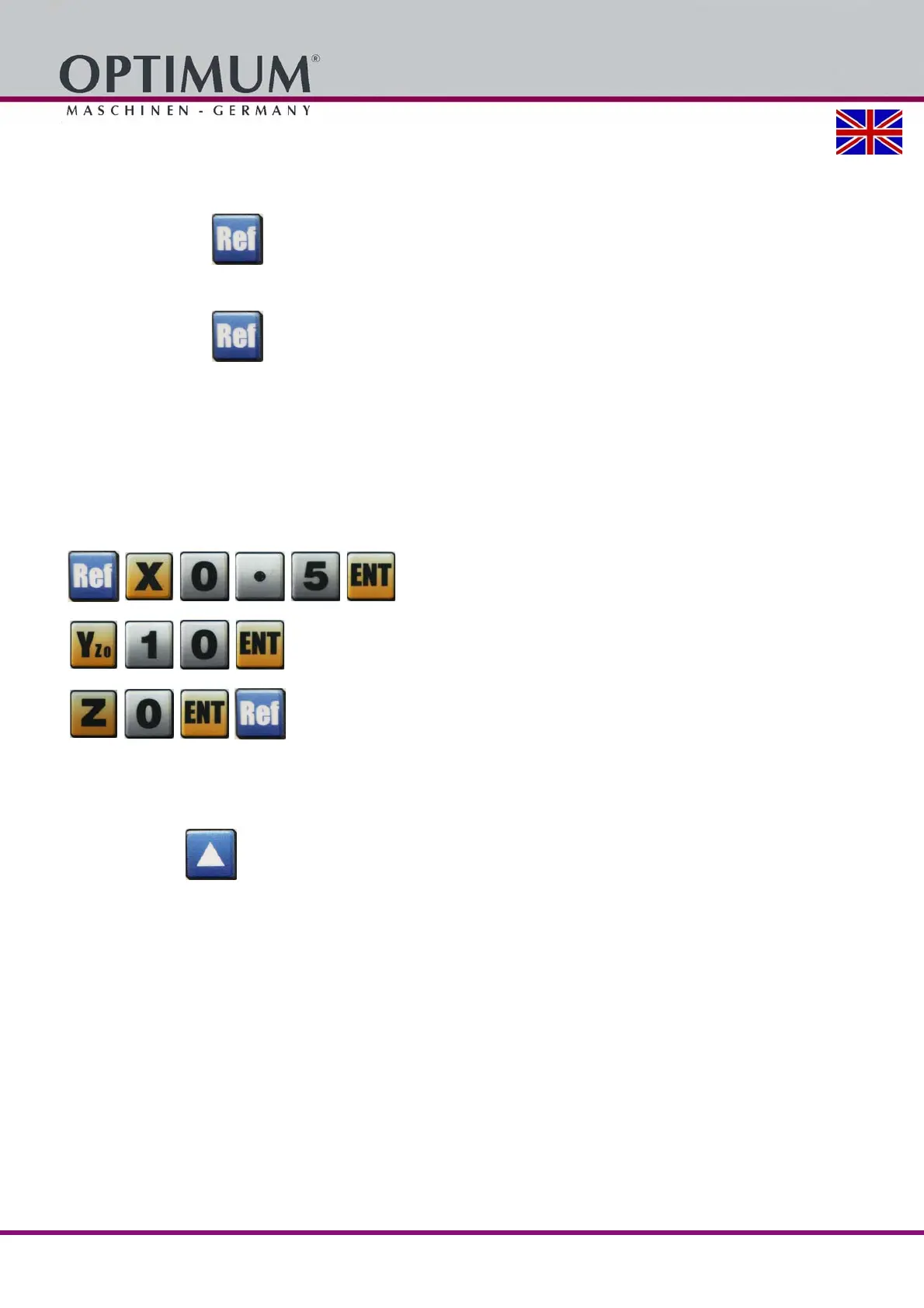
Press the button to activate the reference marker function.
The LED flashes.
Press the button to exit from the Reference Marker function.
The set reference mark values are now transferred to the axis display.
Example:
Setting the values.
After pressing the reference mark function, the following values should be set: 0.500 for the X-
axis, 10 for the Y-axis, and 0 for the Z-axis.
Press the following keys in the order shown in order to set these values.
5.4 Machine zero point function
For the setting of an absolute zero point.
Press the button . The LED flashes.
The axis values shown for the current machine position are reset to zero. Values for the axes
may also be input where needed.
When the machine zero point is turned off, the previous values are shown again.















 To Next Page