2-82
INSTALLATION ORBAN MODEL 8685
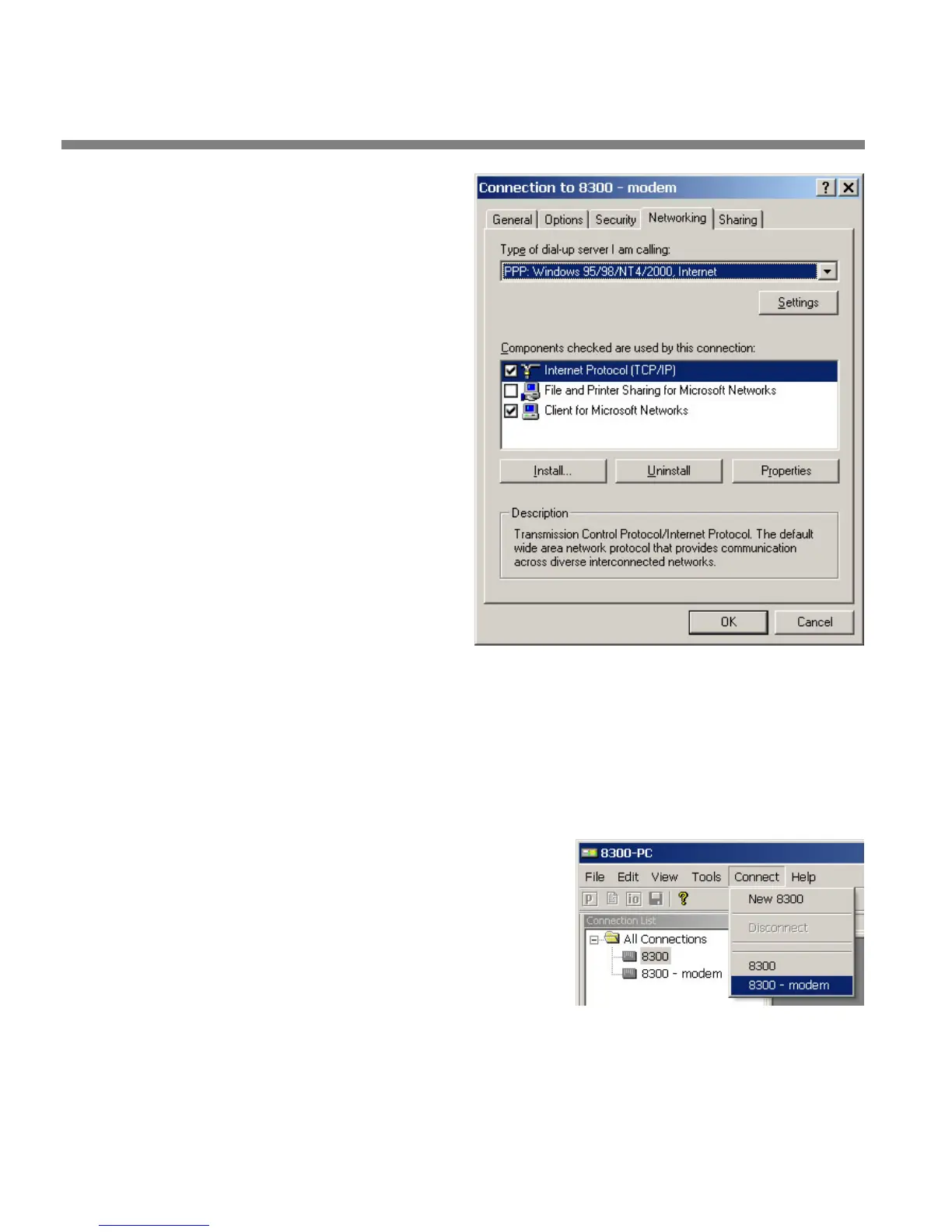
k) Select the Networking
tab.
l) Make sure that “PPP:
Windows 95/98/NT
4/2000, Internet”
appears in the “Type
of dial-up server I am
calling” field.
m)Make sure that
“Internet Protocol
(TCP/IP) is checked.
You may leave
“Client for Mi-
crosoft Neworks”
checked if you
like.
n) Click “OK.”
o) When the “Connec-
tion properties” win-
dow appears, click
“OK.”
2. Launch a Windows 2000 Modem connection.
Once you have set up a “connection” specifying a modem connection in the 8685
PC Remote application (see To set up a new connection on page 3-65), choosing
this connection from 8685 PC Remote automatically
opens a Windows modem
connection to your 8685.
You can connect by selecting the desired connection from the drop-down list in
the C
ONNECT menu.
You can also connect by double-clicking
the connection in the “Connection List”
window.
If the connection is successful, a dialog
bubble will appear on the bottom right
hand corner of the screen verifying your
connection.
If you have trouble making a connection, refer to OS Specific Troubleshooting
Advice: Troubleshooting Windows 2000 Modem Connect on page 5-Error!
Bookmark not defined.. If you have trouble the first time after creating a con-
nection according to the instructions above, try restarting your computer to clear
its serial port.



 To Next Page