ADF SERIES™ OPERATION MANUAL
SECTION 10:
LAN Interface Configuration
Entire Contents Copyright 2018 by Pacific Power Source, Inc. (PPS) • All Rights Reserved • No reproduction without written authorization from PPS.
ADF Series Power Source Operation Manual Page 310 of 349
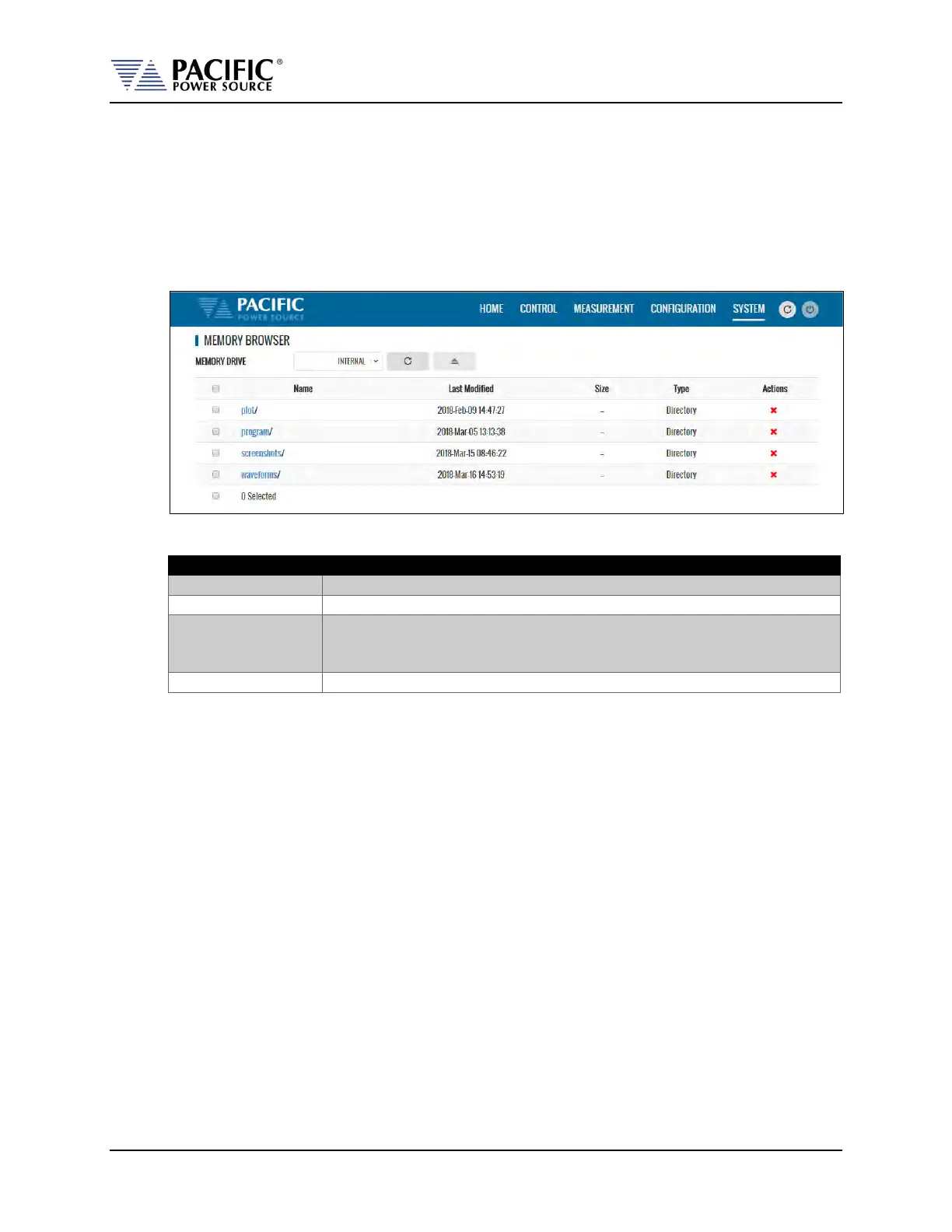
10.10.9 Memory Browser
The Memory Browser screen shows available memory devices connected to the instrument
including internal memory and available directories and files. All data and setup files are in XML
format. Waveform files are stored in CSV format. Screen captures are stored in PNG image
format.
Available MEMORY DRIVES are INTERNAL, RAM and any USB or SD-Card memory devices that
are mounted.
Useful directories for the user are:
Data logger plots in csv file format with date and time stamp
Power source program settings
Screen capture image files in .png format with date and time stamp. To
capture any LCD display, press the LOCAL key and the number 1 key on the
decimal keypad at the same time.
User waveform data points in csv file format.


 To Next Page