ADF SERIES™ OPERATION MANUAL
SECTION 6:
Front Panel Operation
Entire Contents Copyright 2018 by Pacific Power Source, Inc. (PPS) • All Rights Reserved • No reproduction without written authorization from PPS.
ADF Series Power Source Operation Manual Page 98 of 349
6.4.11.3 Higher Voltage Settings (Requires Option V)
For applications requiring more than 312V L-N, refer to the “SOURce:VOLTage:EXTend”
command in the programming section of this manual. Only available if Option V has been
installed.
6.4.11.4 Extended Voltage Range Power Limit Setting
Applicable output power restrictions as stated above will result in adjustment of the
programmed kW and kVA power limits in the PROGRAM screen. This occurs automatically
when programming an AC voltage value higher than 300 and is based on the value set and
the standard available max. power level of the ADF model used. An Event Message is
generated to notify the user of this restriction.
6.4.11.5 Accessing Extended Voltage Ranges
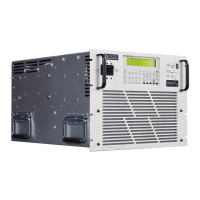
To enable higher voltage operation, the user must first set the MAX USER LIMIT for Vac to
more than 300.00V. Values from 300.00 to 312.00 will be accepted.
Figure 6-5: Enable Vac extended operating range to 312Vac
Once the Voltage AC MAX user limit has been set to a higher value, the PROGRAM screen
will accept a Volt AC setting up to this new value.
When a value above 300 is entered in any of the available Vac setting fields, an Error &
Event (E&E) message will be generated in the Error and Event Queue. The E&E field in the
bottom status bar will blink to indicate a message is available. Note that the power limit
fields will automatically update as needed to indicate the power limit.
For applications requiring more than 312V L-N, refer to the “SOURce:VOLTage:EXTend”
command in the programming section of this manual.


 To Next Page