Section
300~Installation
Chapter
4.
Trunks
and Lines
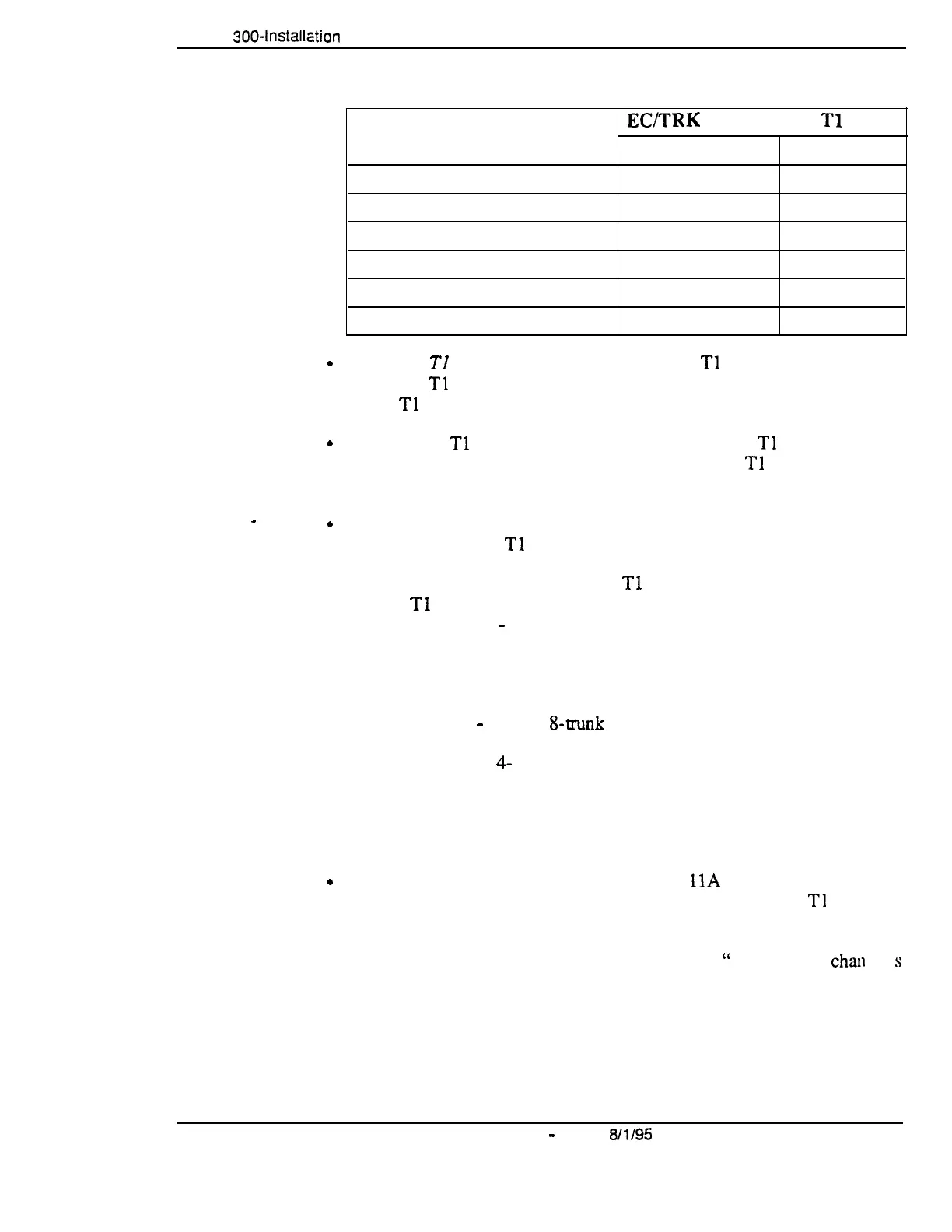
Table 4-8.
Tl slot usage for two-cabinet systems
.
.
I
.
.
System Size
EC/TRK
Slot Usage for
Tl
Master Slave
DBS 40 + DBS 40
No
Yes
DBS 72 + DBS 40
No No
DBS 72 + DBS 72
No
Yes
DBS 96 + DBS 40
Yes Yes
DBS 96 + DBS 72
Yes
Yes
DBS 96 + DBS 96
Yes
Yes
Fractional
TI can be used when fewer than 24
Tl
trunks are needed.
Fractional
Tl
allows you to use only a portion of the 24 channels provided
on the
Tl
card.
Though each
Tl
Interface provides 24 trunk channels,
Tl
trunks do not
increase the overall trunk capacity of the DBS. Each
Tl
channel subtracts
from the total number of analog trunks that can be installed.
With CPC-B earlier than 5.00, the number of analog trunks that can be
used with Fractional
Tl
are always decremented in quantities of 8.
For example, if you are installing a
Tl
in a DBS 96 and you only want to
use 12
Tl
channels, the logical number of analog trunks that would be
available is 20 (32
-
12 = 20).
The number of analog trunks must be decremented in quantities of 8. the
actual number of analog trunks that can be used is 16:
(32 total trunks
-
16 (two g-trunk increments) = 16.)
Tables.69 through
4-
11 show the possible combinations of analog and
digital trunks assignments based on system size.
The trunk numbering shown in these tables is determined by backplane
trunk port assignments. Therefore, the numbering cannot be changed.
With CPC-B 5.00 and higher and the VB-435
11A
Loop Start Trunk Card,
the number of analog trunks that can be used with Fractional
Tl
are
decremented in quantities of 1.
Note:
Analog trunks are numbered beginning with “ 1.” T 1 trunk
than
nel
s
are numbered beginning with the highest trunk channel used.
DBS-70-300
DBS Manual
-
Issued
8/l/95
4-l 3
Technical Manuals Online! - http://www.tech-man.com















 To Next Page